
PayTo UX guide
Use this guide to build a PayTo payment journey that is compliant and that your customers will choose. It tells you what you must do to pass Azupay’s UX review, and what you can do to increase PayTo uptake
How the three names connect, and which name to show your customers.
The mandatory items you need to pass Azupay's UX review.
Practical ways to increase PayTo uptake and give your customers a great experience.
Where to get help with your PayTo payment experience.
Introduction
The importance of great user experience (UX)
A great user experience (UX) can help drive:
A well-designed, intuitive user experience encourages customers to adopt PayTo and continue using it, driving repeat engagement over time.
PayTo allows customers to authorise payments from their bank accounts. Ensure customers understand what they are authorising and that the relevant terms and conditions are clearly presented.
Making checkout, top-up and payment processes easier reduces friction and helps increase conversion rates.
Differentiate your brand from competitors and generate loyalty with an experience that creates positive associations.
How to use this guide
- Read each section carefully. You'll learn about the mandatory requirements to pass Azupay's UX review, and hints for best practice depending on how you want to launch PayTo at your business.
- All mandatory requirements have a checklist to help keep you on track of what must be completed to pass the UX review before launch.
- Tick off each mandatory item in the checklist as completed.
- Follow best practice and recommendations for ideas on how to give your customers a great PayTo experience.
Naming Convention: PayTo, PayID or Pay by Bank?
Which do you use? Here's useful information to explain how PayID, PayTo and Pay by Bank are connected.
We suggest using Pay by Bank
PayTo transactions are also being referred to as Pay by Bank on customer facing information by businesses that have launched the new payment method. Within this guide, you will see the reference to PayTo, which is the New Payments Platform real-time payment solution that powers customers' Pay by Bank transactions.
We recommend you use Pay by Bank in your customer facing information.
We also recommend displaying the PayID logo next to Pay by Bank (refer right), as your customer will be using their personal PayID to create their PayTo agreement with your business and allow you to receive automatic payment from their bank account.
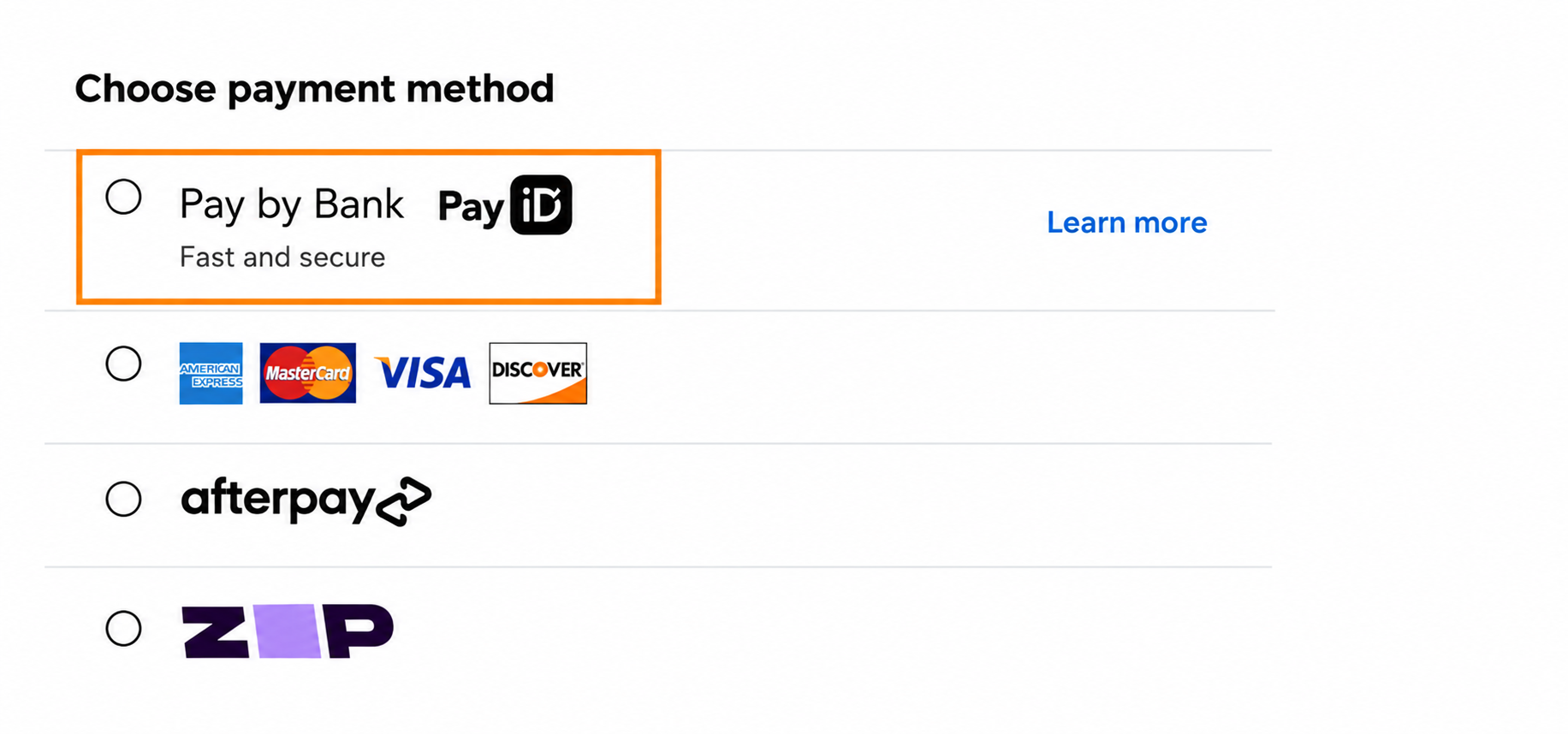
Pay by Bank is a customer friendly way to let your customers know they will be paying from their bank account. PayTo is the payment solution (powered by Azupay) your business will use to help your customer instantly pay you from their bank account via an authorised automatic payment.
Must do
Important information: you must complete all mandatory checklist tasks before submitting for UX review with Azupay.
- Use logos as per NPPA guidelines
- Display a link to PayTo terms and conditions
- Refer to the PayTo agreement or payment agreement
Must do #1: Use the PayID and PayTo logos
When using the PayID or PayTo logos in your payment flow, please ensure you follow the New Payments Platform Australia (NPPA) guidelines (available below).
This guide outlines the visual identity of the PayID brand and how these assets should be applied.
This marketing kit is designed to help businesses communicate PayTo to their customers. These guidelines also outline the visual identity of PayTo and how these assets should be applied.
Must do #2: Display a link to PayTo terms and conditions
You must have a link to your merchant PayTo terms and conditions on your website or displayed in your payment flow, which is visible and can be easily accessed by your customers. Host these on your website, or, if you use the Azupay Pay by Bank checkout, email [email protected] to add your terms and conditions to it.
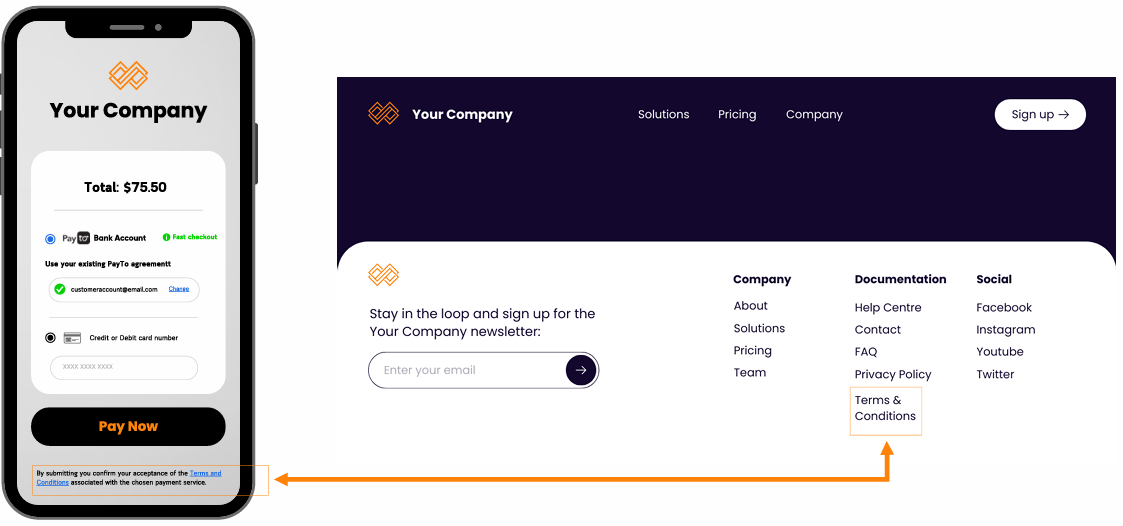
Example of terms and conditions on your website
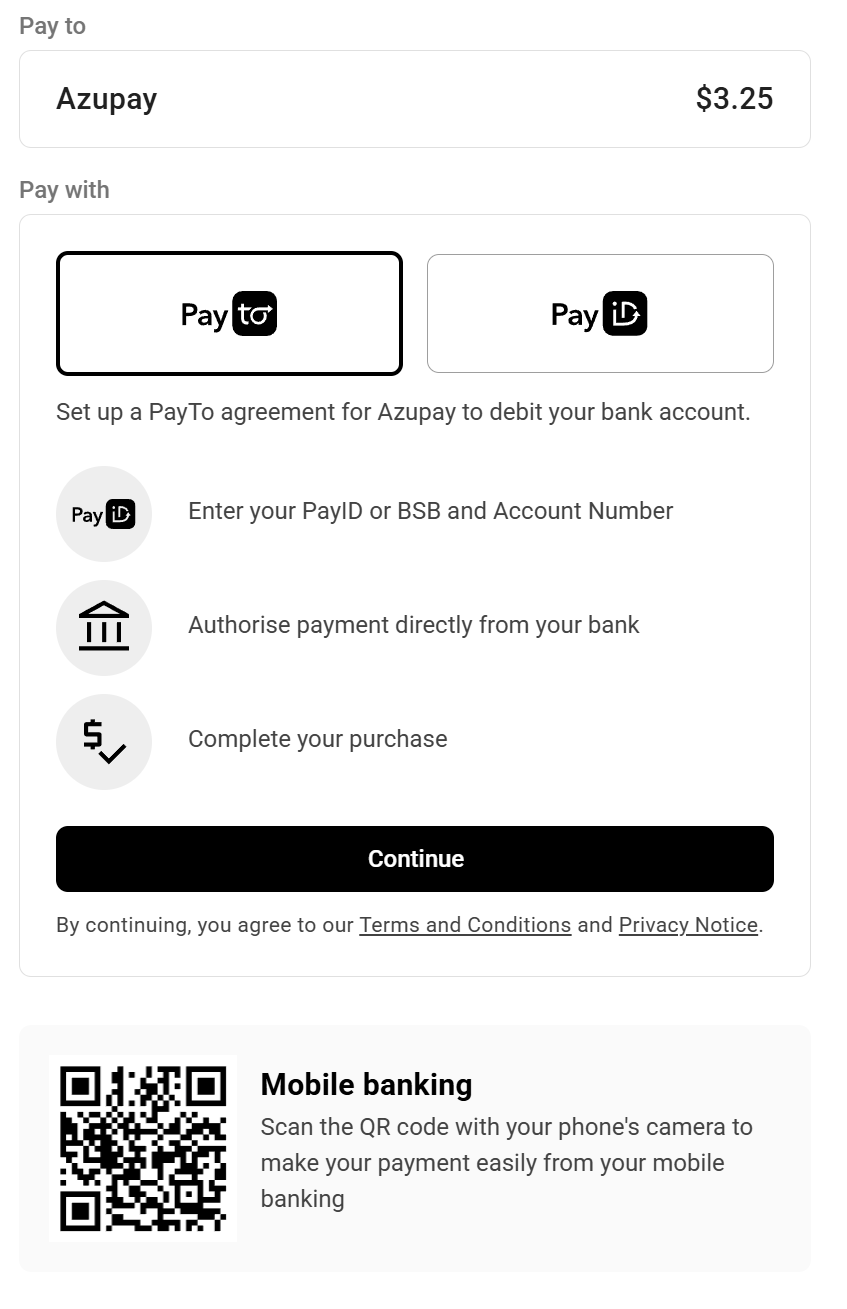
Example of terms and conditons in the Pay by Bank App
Must do #3: Refer to the PayTo agreement
If you refer to a customer agreement in your payment flow or help instructions, make sure to use the term PayTo agreement or payment agreement.
Why?: Your customers see and approve the agreement in their banking app, where banks use this term. When you use the same term, customers know what to look for. This decreases confusion, increases trust and helps more customers complete the approval.
Best Practice
The following information provides best practice advice to help you create a great PayTo payment experience for your customer. We suggest including these best practice steps in your design and launch plan.
Select each item to see the details.
Empower your customers to choose Pay by Bank
#1: PayID as the default way to pay
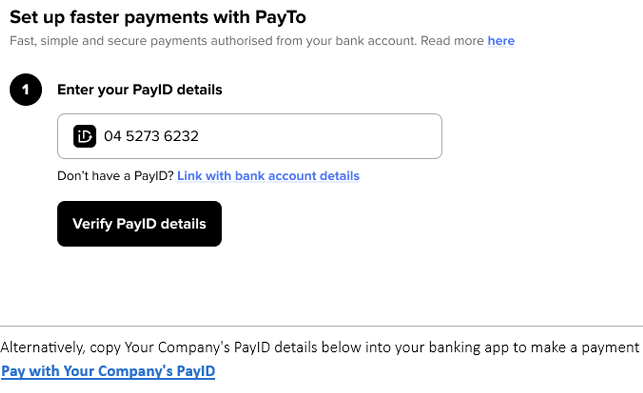
Consider making PayID the default way customers can connect their bank account to a PayTo agreement and pay you.
During payment option selection, customers must decide whether to use PayID or BSB / account number, if offered by you, to connect their bank account to a PayTo agreement.
To help them decide:
- Make input of their personal PayID the only option available to them (default).
- Consider prefilling their mobile number as the PayID (the majority of customers use it as their PayID).
- Allow a customer to change their PayID to their email address if they don't use their mobile number.
Why?: Most customers know their mobile number or email address, but few know their BSB and account number. A PayID is faster to enter and causes fewer input errors. This decreases friction and helps more customers complete the PayTo agreement.
#2: Offering PayID and BSB / account number for PayTo agreements
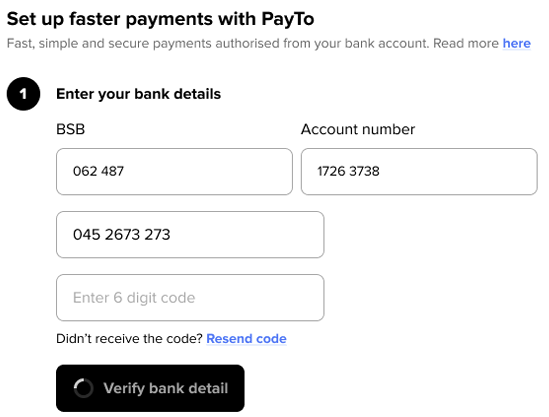
Consider offering your customer the ability to provide a PayID or BSB / account number, or offer both, when creating a PayTo agreement with your business.
Entering mobile number or email address PayID details can be your default option. To also help customers, you could offer them to enter their BSB / account number as an alternative way to create a PayTo agreement with you.
Why?: Some customers do not have a PayID, or their account does not have a PayID linked to it. A BSB / account number option gives these customers a way to pay, so you do not lose the sale.
#3: Acknowledgement of terms & conditions
It's important to have the T&Cs acknowledged by your customer when creating a PayTo agreement.
You should include a statement advising your customer that by choosing to create a PayTo agreement as their payment option and proceeding, they confirm the acceptance of your PayTo terms and conditions.
Ensure you include a link to your PayTo T&Cs (detailed in Must do #2 above) within this acknowledgement statement, for the customer to access if required before accepting.
Why?: The acknowledgement gives you a record that the customer accepted your terms before they created the PayTo agreement. It also makes sure the customer knows what they agree to. This helps protect your business if there is a dispute.
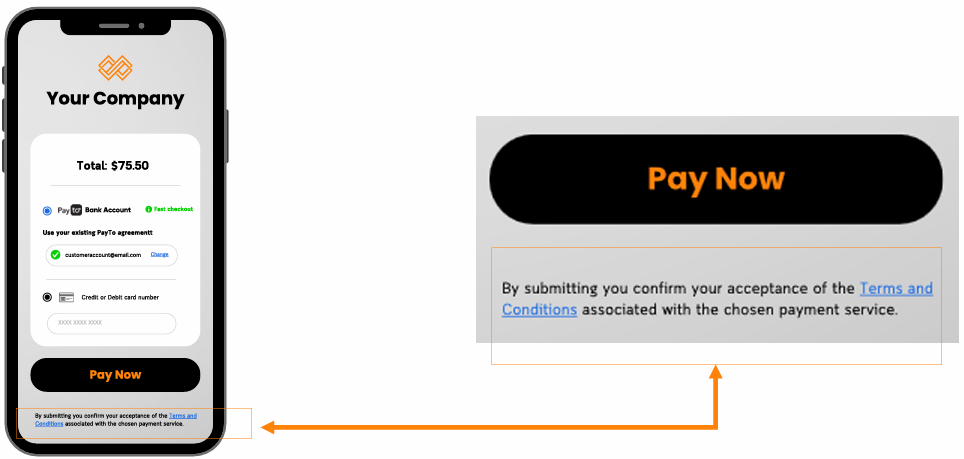
Example: By submitting you confirm your acceptance of the Terms and Conditions associated with the chosen payment service.
#4: Allow customers to review the details of their PayTo agreement
Help your customers feel safe by letting them know they are paying you via a PayTo agreement.
Customers should be provided information to review before authorisation of the payment, including:
- Detail of payment method (they have selected PayTo to make the payment)
- Your business name
- Information on the next steps to authorise the PayTo agreement. For example: "You will be directed to your banking app / internet banking to approve and authorise this PayTo agreement".
Why?: Your business name also shows in the customer’s banking app. When the details match, the customer knows the request is genuine. This decreases scam concerns and helps more customers approve the agreement.
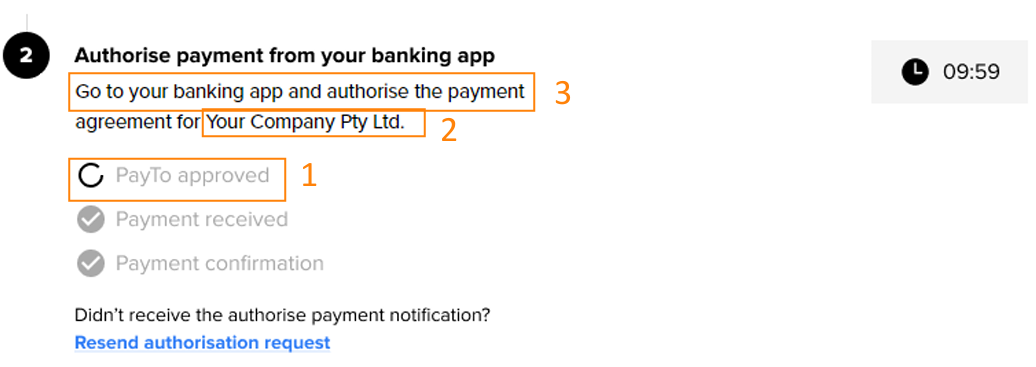
#5: Instruct your customer to authorise their PayTo agreement
Authorising a PayTo agreement is safely completed in the customer's bank app or internet banking. No apps, no downloads.
It's important to communicate clearly to the customer that they must open and log into their mobile banking app or internet banking to authorise their PayTo agreement.
Why?: The PayTo agreement does not become active until the customer approves it in their banking app. If the customer does not know this step, the agreement stays pending and the payment cannot go through.
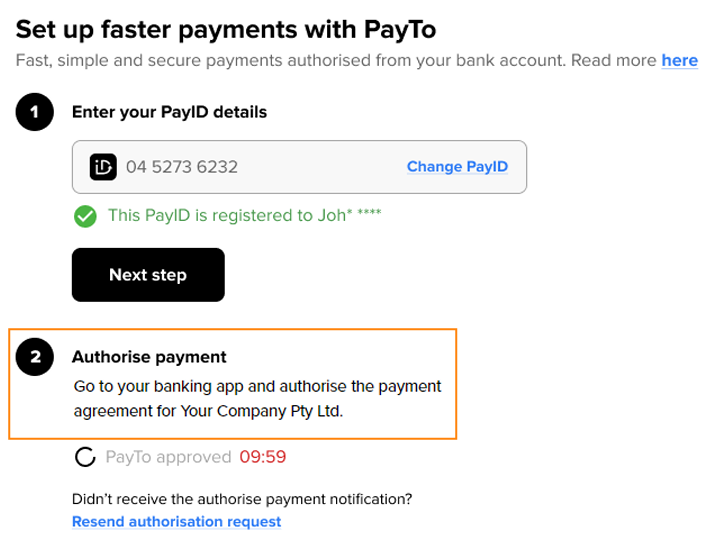
#6: Helping customers with information on the PayTo authorisation process
You can support your customers who are new to PayTo with step-by-step information on how to create and authorise a PayTo agreement.
Provide a link or display instructions on how to authorise a PayTo agreement in a bank app or internet banking.
PayTo banking instructions can be found here.Why?: PayTo is new to many customers. Clear step-by-step help decreases uncertainty, drop-offs and support calls.
Hint: Azupay can help you with pre-built client facing information (example below).
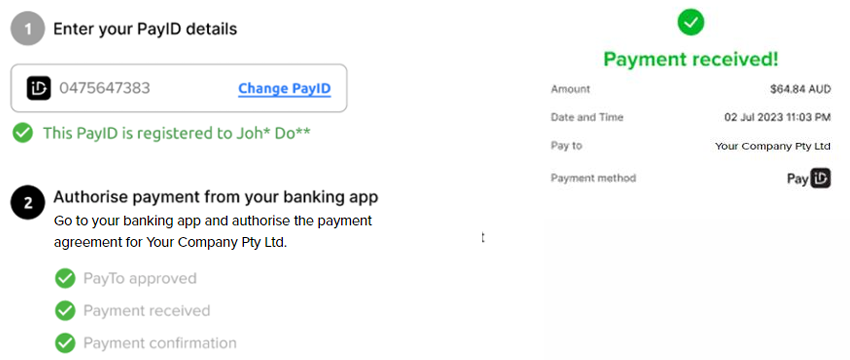
#7: Display successful payment confirmation
Let your customer know their payment has been processed via an on-screen confirmation.
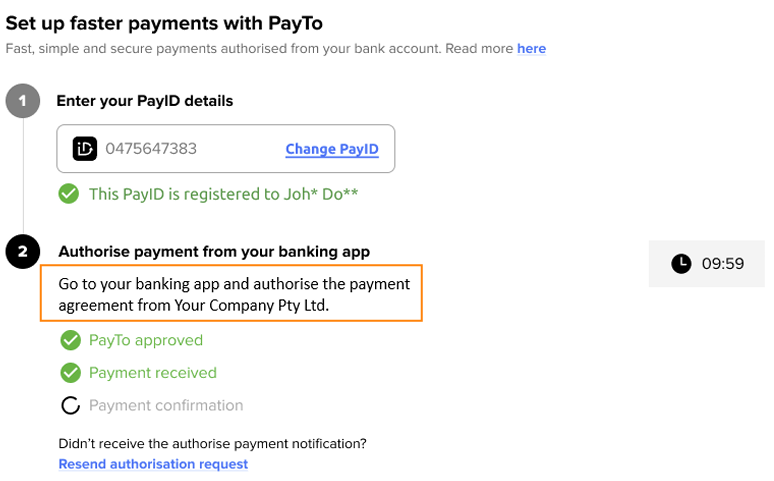
Display confirmation that the customer's PayTo agreement has been successfully authorised and payment has been received.
Why?: A clear confirmation tells the customer the payment is complete. This stops them from trying to pay again or contacting your support team, and gives them confidence to use PayTo next time.
Promoting Pay by Bank
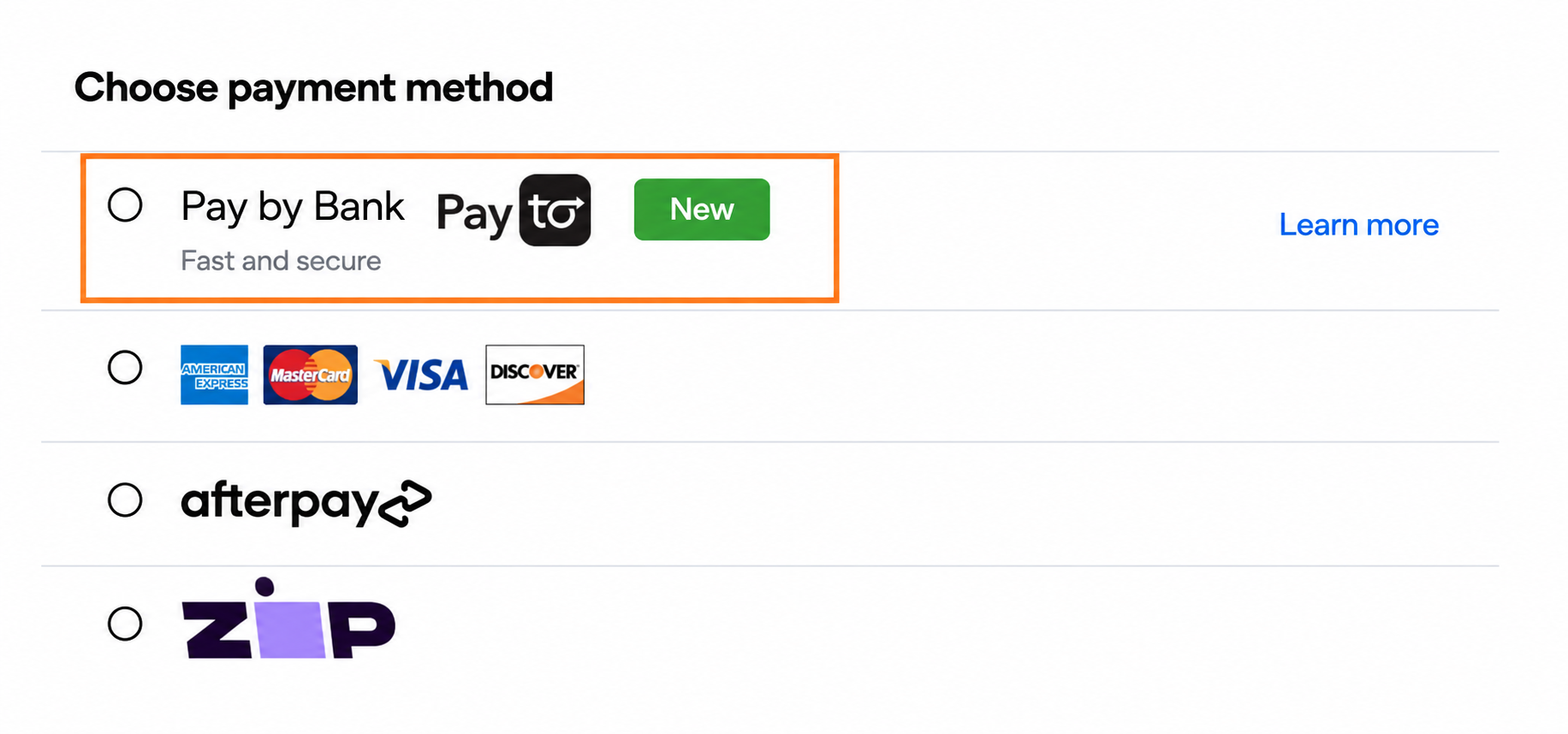
#8 Highlight PayTo with clear benefits
Use a short, customer-focused description to communicate PayTo's benefits and help customers make an informed payment choice.
Where appropriate, use a prominent flag such as “New” or “Recommended” alongside the payment option.
Examples of labels and descriptions include:
- Fast and secure
- Instant and secure
If PayTo is a new payment option, promote it through your website, customer communications and other appropriate channels.
If PayTo has lower processing costs than other payment methods, consider offering an incentive for customers who choose Pay by Bank. This can encourage adoption and help reduce ongoing payment costs.
Progress and error messages
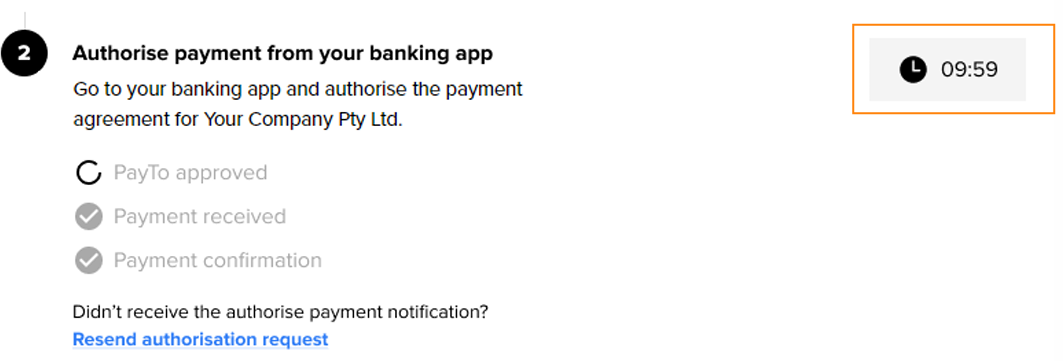
#9: Highlighting the time left to authorise a PayTo agreement
Adding a ticking down clock with a customised timeframe reminds your customer to act immediately.
Set the time frame for payment agreement expiry and show the user the time they have to authorise the agreement to complete their payment to you.
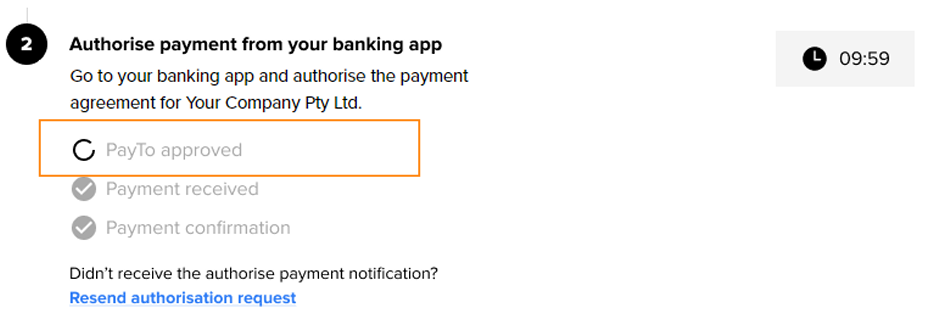
#10: Display a loading indicator so your customer knows the final process is underway
A moving loading indicator shows your customer that activity is happening with their payment.
Following your customer's authorisation of their PayTo agreement, it will take an average of 7 seconds for it to appear in their mobile banking and internet banking.
Use a loading indicator to show the user that there is something happening while they are waiting.
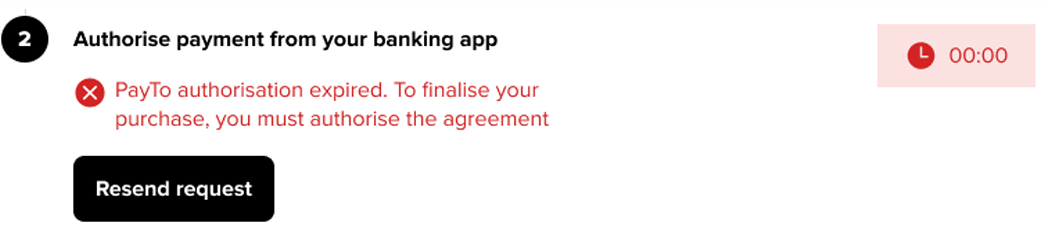
#11: Authorisation expired - resend the PayTo request to authorise
Sometimes things just happen and a customer may miss authorising their PayTo agreement in the allotted time. A simple solution is to let the customer request to resend the PayTo agreement.
If your customer does not authorise their PayTo agreement within the designated time, display a message advising the user that they will need to resend the authorisation request.
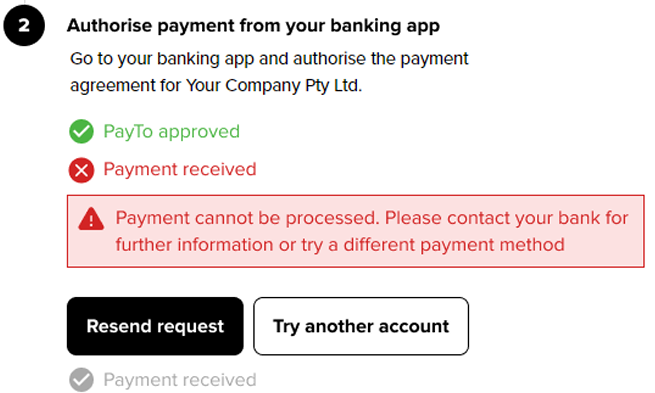
#12: Payment cannot be processed - contact bank for further information
A customer's payment may be rejected. Let them know they have options to continue with payment to your business.
If the payment fails and cannot be processed, advise your customer so that they can try again or choose another payment method.
#13: Payment cannot be processed - insufficient funds
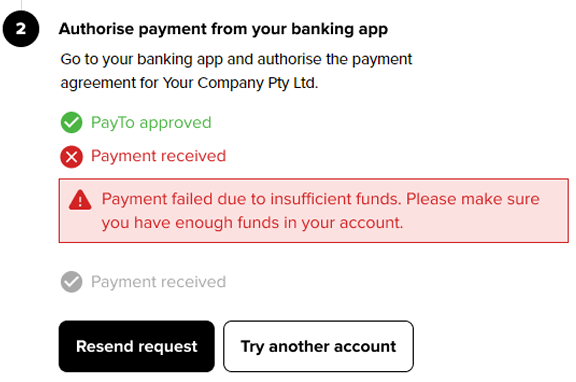
A customer's payment may be rejected due to insufficient funds. Let them know they have options to continue with payment to your business.
If the payment fails due to the customer's account having insufficient funds, advise the user so that they can:
- Transfer funds into the account and retry payment
- Select another payment method
After payment and rewards
#14: Send your customer push comms after payment
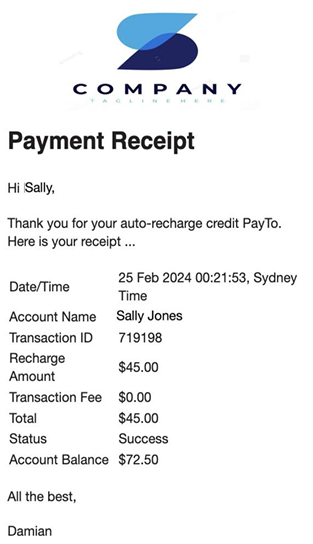
Recommended: PayTo provides your customer and you so many benefits. A simple "purchase finalised" message via text or email can help build a strong relationship and assist to generate return sales.
Help build trust and connection to your business by sending your customer an email or text message advising them of their successful PayTo / Pay by Bank payment.
#15: Offer an incentive to pay with PayTo, such as cashback
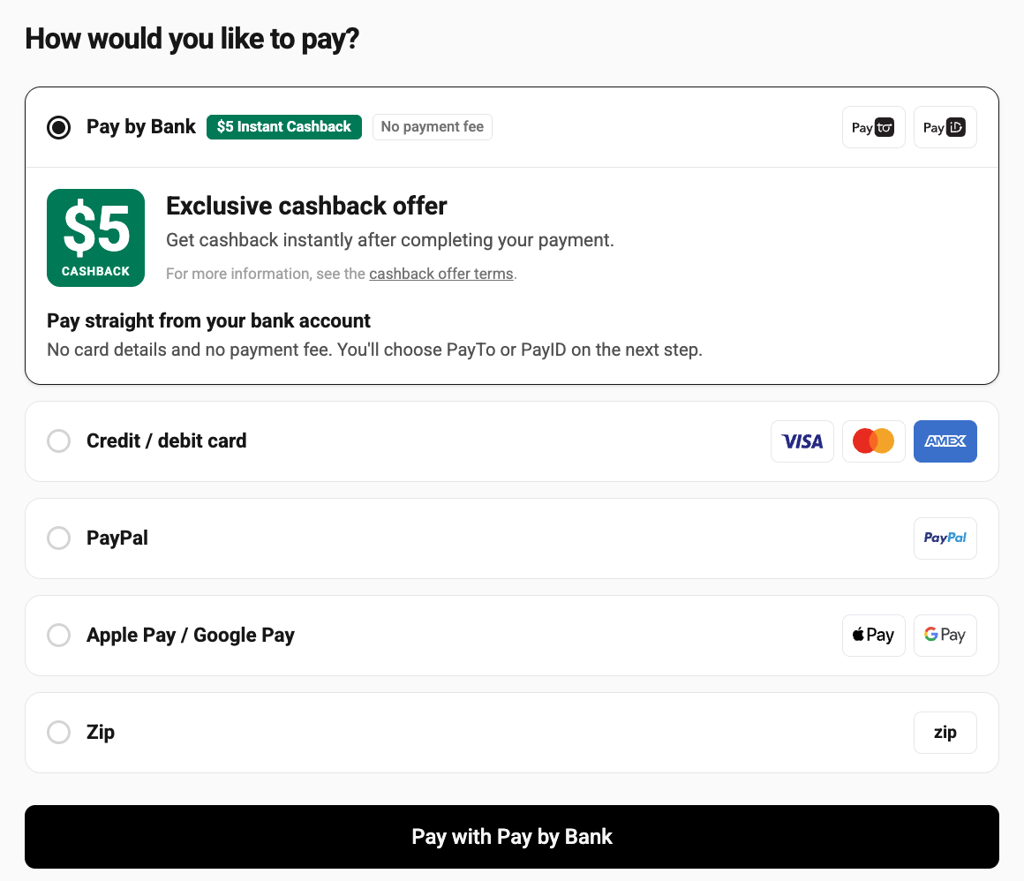
Offering an incentive, such as cashback, can encourage customers to try PayTo. Make the offer clear at checkout so customers understand the benefit before choosing how to pay.
Why this helps:
- Encourages customers to try something new. An incentive gives customers a reason to choose PayTo instead of their usual payment method.
- It builds a new habit. After customers use PayTo once and see how fast and easy it is, they are more likely to use it again, with or without the offer.
- It can reduce your costs. If PayTo costs you less to accept than cards, the saving on each payment can pay for the cashback.
- It makes PayTo stand out. An offer next to the PayTo option helps customers see it among the other payment methods.
Cashback with Azupay: Cashback is available in the Azupay Pay by Bank checkout app.To set it up, contact [email protected]
How to present the offer:
- Make the benefit clear. Show the cashback amount next to PayTo. For example: “Get $10 cashback when you pay with PayTo”.
- Show the offer only where it applies. Clearly state any minimum spend or eligibility requirements.
- Be transparent about the payment. Don't present cashback as a discount on the purchase price; customers still pay the full amount at checkout.
- Confirm the payment. After payment, show that it is complete and display the full amount paid.
- Explain the cashback process. Tell customers when to expect the cashback and where it will be paid, such as the bank account they paid from.
- Keep checkout moving. Let customers complete their payment without waiting for the cashback to arrive.
- Meet your compliance obligations. You are responsible for ensuring your cashback offer complies with applicable laws. Azupay's Cashback solution guides you through the relevant requirements.
Keep the offer terms, such as dates, minimum spend and limits, easy to find. Remove the cashback message as soon as the offer ends or is paused.
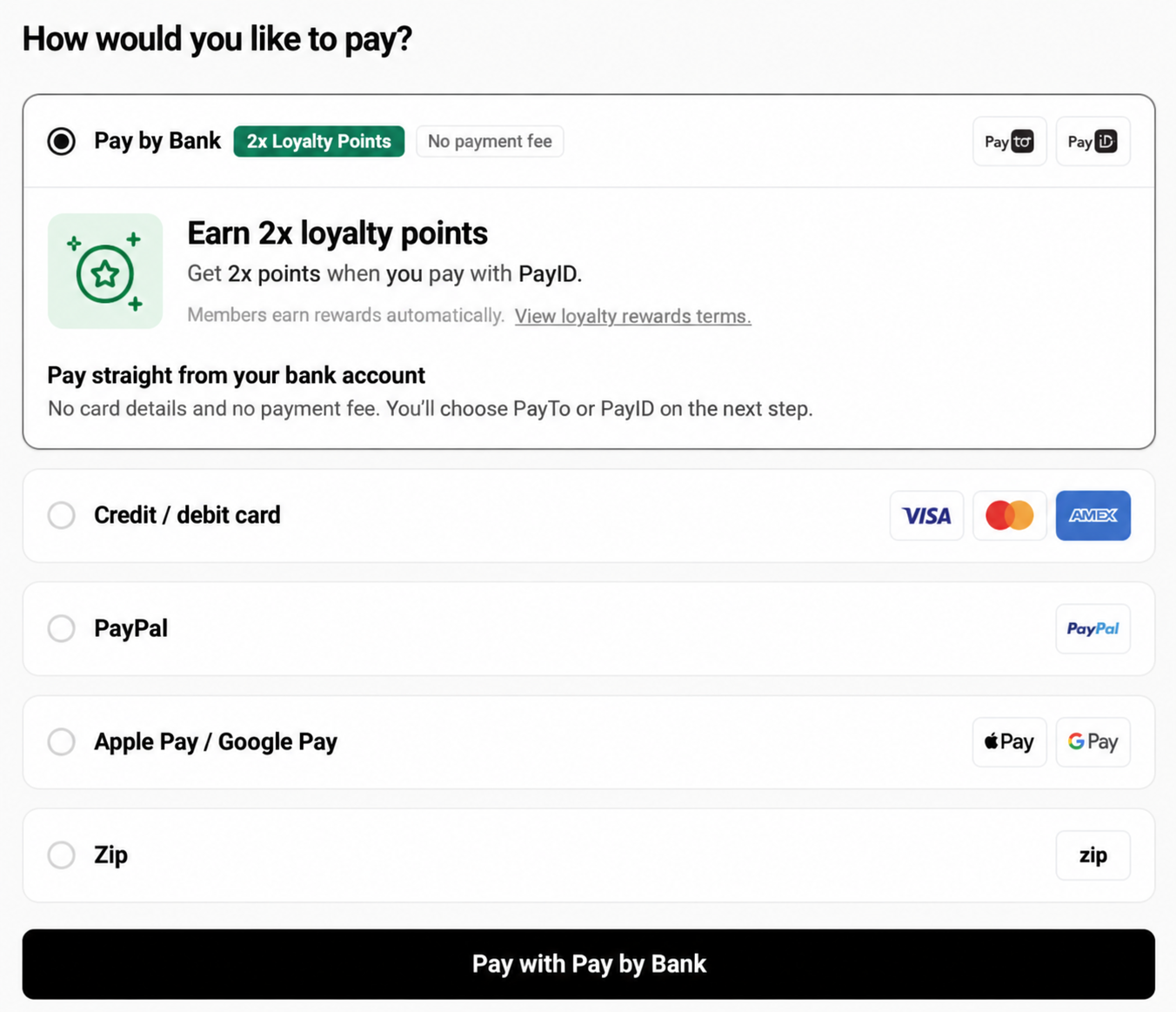
#16: Loyalty programs (Customer Incentives)
If you run a loyalty program, reward members for paying with Pay by Bank. Bonus points are a simple way to do this.
- Show the reward next to the Pay by Bank option. For example, "Earn 2x points when you pay with PayTo".
- Remind signed-in members of the reward before they choose how to pay.
- Prompt guests to sign in or join before they pay, so they don't miss out.
- On the confirmation screen, show the points earned and when they will appear in the member's account.
- Keep the reward rules short and link to the full terms.
Why this helps:
- It gives customers a reason to change. Most customers use the payment method they know. An incentive gives them a clear reason to try PayTo.
- It builds a new habit. After customers use PayTo once and see how fast and easy it is, they are more likely to use it again, with or without the offer.
- It makes PayTo stand out. An offer next to the PayTo option helps customers see it among the other payment methods.
Use the same program name and points language that customers see elsewhere on your website or app. A familiar offer is easier to trust.
#17: Discounts for eligible payments (Customer Incentives)
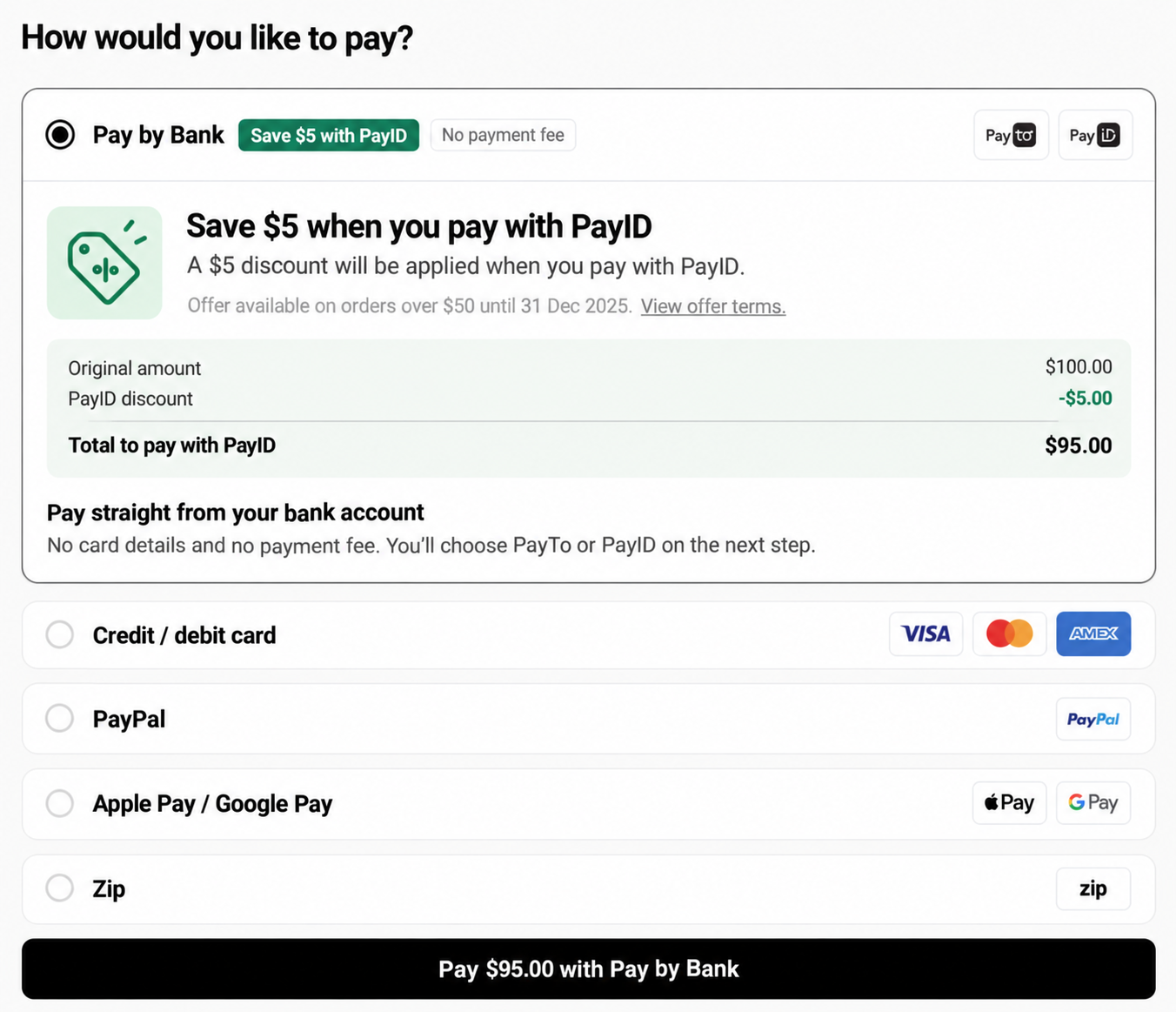
If you offer a discount for paying with Pay by Bank, make the saving visible before the customer chooses how to pay.
- Show the discount next to the Pay by Bank option. For example, "Save 2% when you pay with Pay by Bank" or "$5 off when you pay with Pay by Bank".
- Show the original amount, the discount and the new total, so the customer can see what they save.
- Make sure the payment amount is the discounted amount. The amount the customer sees must match the amount they pay.
- State any conditions, such as minimum spend or offer dates. If a purchase doesn't qualify, don't show the discount.
- On the confirmation screen, show the amount paid and the amount saved.
Why this helps:
- It gives customers a reason to change. Most customers use the payment method they know. An incentive gives them a clear reason to try PayTo.
- It builds a new habit. After customers use PayTo once and see how fast and easy it is, they are more likely to use it again, with or without the offer.
- It can reduce your costs. If PayTo costs you less to accept than cards, the saving on each payment can pay for the discount.
- It makes PayTo stand out. An offer next to the PayTo option helps customers see it among the other payment methods.
If the customer changes their payment method after they see the discount, update the total straight away. Make it clear in your terms how refunds work for discounted purchases.
Support, contacts and resources
For guidance and support on designing your UX payments experience, contact [email protected]
Raise a request with the Azupay service desk.
A sample you can use when you write your own PayTo terms and conditions.
Further information on the Azupay PayTo checkout app.
Updated 41 minutes ago