
Pay by Bank (Pay and Subscribe)
Pay and Subscribe with Pay by Bank lets you take one initial payment of any amount and set up ongoing recurring payments under a single agreement the customer approves. The initial payment and the recurring payments can be for different things.
For consumers
Payment method description
Payment method name: “Pay By Bank”
Short description: “Easy and secure recurring payments”
Longer description: “Pay by Bank is supported by all major banks. An easy and secure way to make an initial payment and then set up a subscription to make regular recurring payments straight from your bank account, 24/7 365 days. You stay in control and can pause or cancel your agreement at any time from your banking app.”
Logos: PayTo logo

Other additional supporting information:
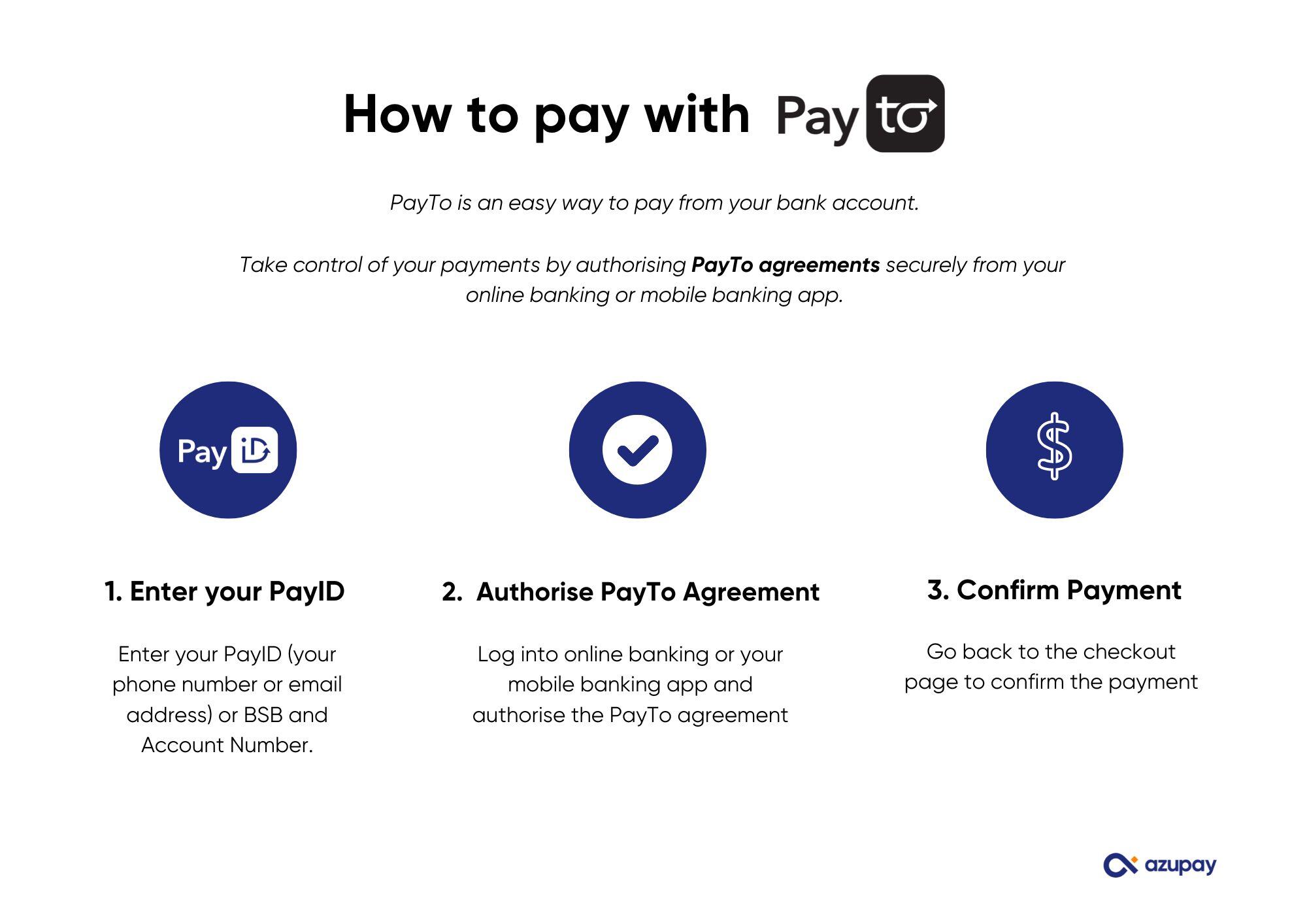
How to pay with PayTo:
- Enter your PayID
Enter your PayID (your phone number or email address), or your BSB and account number. - Authorise the PayTo agreement
Log into online banking or your mobile banking app and authorise the PayTo agreement. This one agreement covers your first payment and your ongoing recurring payments. - Confirm Payment
Go back to the checkout page to confirm your subscription is set up and your first payment is complete.
FAQs for customers
- How does Pay by Bank work when I subscribe?
You approve a single payment agreement in your banking app that covers two things: your first payment (the purchase you’re making today) and your ongoing recurring payments charged weekly, fortnightly, monthly or annually). The first payment and the recurring payments can be different amounts. Each payment comes straight from your bank account, and you can see every amount and how often you’ll be charged before you approve it. - What if I don’t have a PayID? No PayID? No worries! While we recommend registering your own PayID through your mobile banking app or online banking to get the best experience, you can still use Pay by Bank without one. Simply click on 'Link with BSB & Account number' to provide us with your account details in order to set up a PayTo agreement that will allow payments to be made straight from your bank account.
- What if my bank doesn’t support PayTo?
Setting up recurring payments with Pay by Bank requires a bank account that is PayTo enabled, so you’ll need an account with a bank that supports PayTo to set one up. Most major banks and many other institutions support it. You can check whether your bank supports PayTo here: find an institution. If your bank isn’t supported yet, you can choose an alternative payment method at checkout. - Is Pay by Bank safe?
Yes! PayID and PayTo are trusted by all major banks. It’s a secure method of payment that keeps you in control, giving you full visibility of what goes in and out of your bank account - including your recurring payments. - How and when will I be charged for recurring payments?
Your recurring payments are taken automatically from your bank account at the frequency shown in your agreement (for example weekly, monthly or annually). The amount and frequency are displayed in the PayTo agreement before you approve it, so there are no surprises. - How do I find my payment agreement in my banking app?
Log in to your mobile banking app or internet banking. You can easily search ‘agreement’ or ‘PayTo’ to find it. You can view the merchant details, the amount and how often you’ll be charged, all in one place. - How do I pause or cancel my subscription or recurring payments?
You’re always in control. Log in to your mobile banking app or internet banking, find your PayTo agreement, and choose to pause (suspend) or cancel it. If you cancel or pause the agreement, future recurring payments won’t be taken. If you only want to change your subscription, it’s best to contact the merchant as well so they can update your plan. - What happens to the agreement after my first payment?
The PayTo agreement you approved stays active in your mobile or internet banking so your recurring payments can continue. It will remain active until it reaches its end date (if one is set) or until you choose to pause or cancel it.
Pay and Subscribe (with Pay by Bank) - FAQs and information for support teams
What is Pay and Subscribe with Pay by Bank?
Pay and Subscribe with Pay by Bank is an easy and safe way for your customers to make an initial payment and set up recurring payments straight from their bank accounts, 24 / 7 / 365. It combines one initial payment of any set amount with ongoing recurring payments under a single agreement that the customer approves in their banking app before any money leaves their account.
Note: the initial payment and the recurring payments don’t have to be for the same thing.
Pay and Subscribe with Pay by Bank utilises PayTo real-time payment technology on the New Payments Platform (NPP). When the customer approves the agreement, they authorise both the initial payment and the recurring payments at the frequency you’ve set (weekly, monthly or annually). Pay by Bank is supported by all major banks and other financial institutions. Please refer to this list to see the institutions that support PayID and PayTo: find an institution.
Good to know: Because Pay and Subscribe relies on a recurring PayTo agreement, the checkout will only offer PayTo as the payment method (”Pay to our PayID” option used for once-off payments is not available here). Customers who don’t have a PayID can still set up the agreement by entering their BSB and accoun number.
What are the features and benefits of Pay and Subscribe with Pay by Bank?
One transaction, two outcomes: customers approve a single agreement that covers both the initial payment and all future recurring payments (even when they’re for different things) so they don’t need to re-enter details or set up a second payment.
Pay directly and safely from a bank account: customers only need access to their bank account to authorise the agreement.
Full transparency up front: the recurring amount and frequency are shown in the PayTo agreement before the customer approves it.
Secure authentication: customers log in and use their mobile banking app or online banking credentials to approve the agreement, adding an extra layer of security.
Verification of payee: customers can see who they are setting up the agreement with. Your business or merchant details are displayed in the customer’s banking app or online banking.
Customer stays in control: customers can pause (suspend) or cancel the agreement at any time from their banking app.
No new apps or sign-ups: customers do not need to download any new app or sign up to any new service - it uses services already provided by their own bank.
Which bank platforms can approve a Pay by Bank (PayTo) agreement?
| Bank | Mobile App Enabled | Internet Banking Enabled |
|---|---|---|
| CBA | Yes | Yes |
| NAB | Yes | Yes |
| Westpac | Yes | Yes |
| ANZ | Yes | Yes |
| Bendigo | Yes | Yes |
| Macquarie | Yes | Yes |
This table is for the major banks. Pay by Bank agreements can be approved in many more banking platforms. If your customer has difficulty locating their PayTo agreement in their bank app or online banking, ask them to use the search functionality to help locate the agreement awaiting approval.
For more detailed information on approving PayTo agreements with different banks - refer to: PayTo Banking Instructions.
How do customers make payments with Pay and Subscribe (with Pay by Bank)?
Follow these steps to help your customer set up their initial payment and recurring agreement. They will need to:
-
Look for Pay by Bank in the offered payment options
-
Click on the Pay by Bank option
-
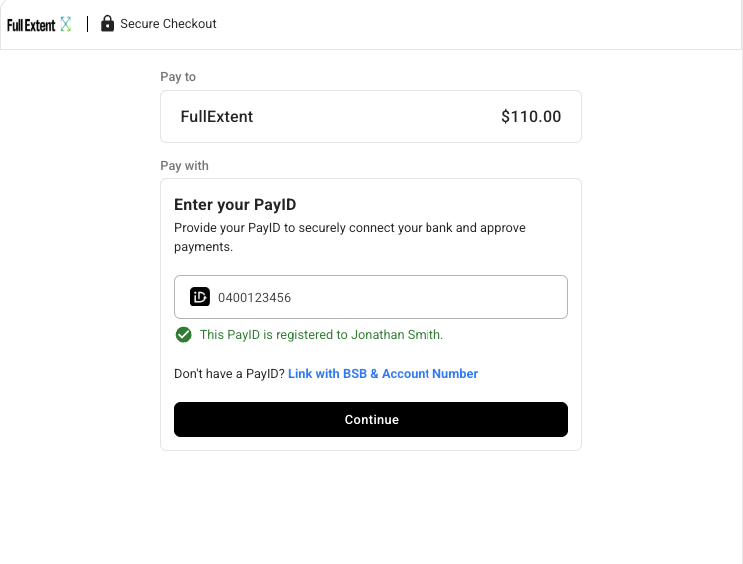
Enter their personal PayID details (or their BSB / account number, account name)
-
Their PayID will be their mobile number or email address, depending on which one they registered to their bank account via their bank app or online banking. If they’re not sure, they can always try - it won’t cost anything and they’ll confirm they have the right details before proceeding. If they don’t have a PayID, they can enter their BSB and account number instead.
-
Click the ‘Verify PayID’ button so the customer can confirm they have the bank account they want to use, then the customer should click on the 'Continue' button.
-
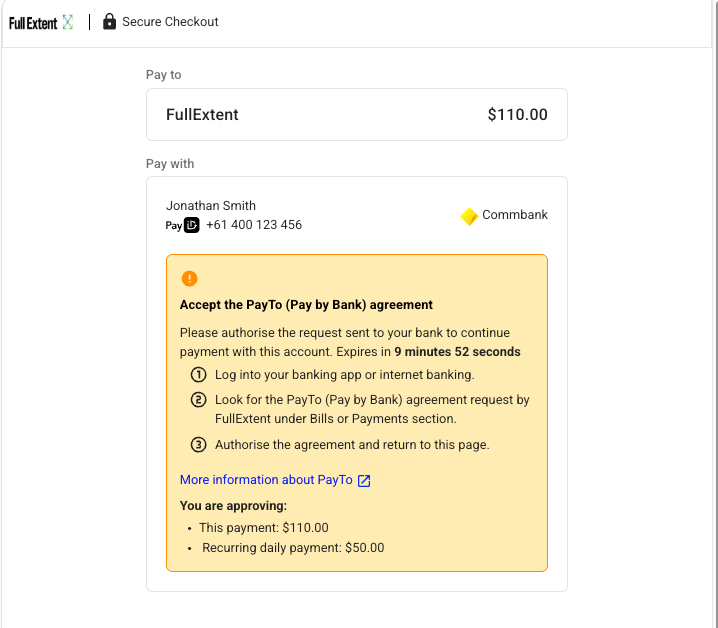
The payment landing page will then ask the customer to 'Accept the PayTo (Pay by Bank) agreement. This payment approval page will display details of the payment they are making today and also future-dated recurring payments and their frequency
-
The customer will then need to open and log in to their mobile banking app or online banking and find the Pay by Bank (PayTo) agreement in their bank app or online banking.
They may need to search for the agreement if it’s not immediately visible. Ask them to search for ‘PayTo’ or ‘Agreement’ in the bank’s search function. They may receive an SMS or app notification from their bank, or there may be a notification within their banking app, to help them find it. -
Confirm the agreement details on screen. The agreement will clearly show the initial payment amount, the recurring amount (which may differ from the initial payment) and how often the recurring payment will be taken (for example weekly, fortnightly, monthly or annually), along with your merchant details.
-
The customer must now approve/authorise the agreement. Their bank may prompt for an additional security check before finalising. The customer can see in real time that the PayTo agreement has been approved and the initial payment received. The agreement then stays active so future recurring payments can be taken automatically.
-
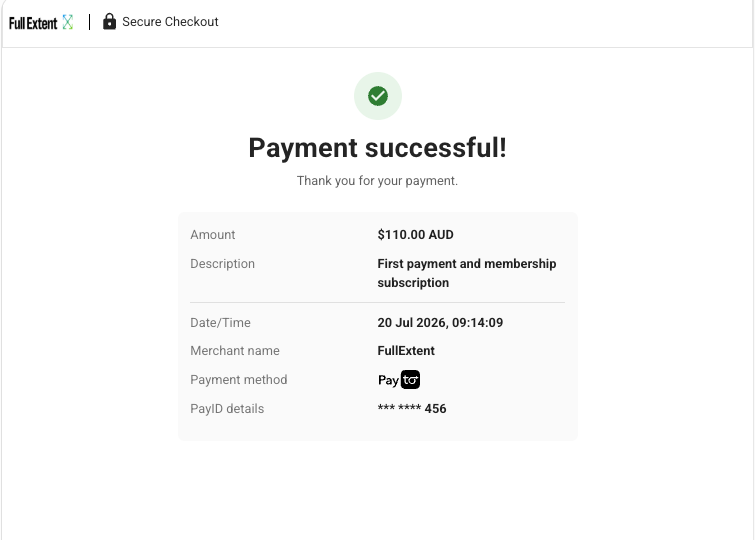
Confirm the ‘transaction is completed’ message on screen
Your customer will see confirmation of the initial payment and that their recurring agreement is now active. If not, please refer to the troubleshooting section below. They may also receive an SMS or email about their transaction.
How are the recurring payments taken?
Once the customer has approved the agreement and the initial payment is complete, the PayTo agreement stays active. Future payments are taken automatically at the frequency set for the recurring payment (weekly, monthly or annually) - the customer does not need to re-enter any details or re-approve each payment.
Each recurring payment is drawn straight from the customer’s bank account and appears in their transaction history, just like the initial payment. As long as the agreement is active and the customer has sufficient funds, recurring payments will continue until an end date is reached (if one is set) or the customer pauses or cancels the agreement.
How can customers manage, pause or cancel their subscription?
Customers stay in control of their agreement from their own banking app or online banking. An agreement can be in one of the following states:
Active - the agreement is active and ready for recurring payments.
Suspended (paused) - the customer has paused the agreement in their banking app. Recurring payments won’t be taken while it’s suspended, but the agreement can be reactivated.
Cancelled - the customer has cancelled the agreement in their banking app. No further recurring payments can be taken.
If a customer wants to pause or cancel, direct them to log in to their banking app or online banking, search for ‘PayTo’ or ‘Agreement’, and choose the pause or cancel option. If a customer is changing (rather than stopping) their subscription, it’s best they also contact your team so the plan can be updated on your side. If a scheduled recurring payment doesn’t go through, check whether the customer has paused or cancelled the agreement - and reach out to the customer if the subscription needs to continue.
What if my customer’s bank doesn’t support PayTo?
Pay and Subscribe with Pay by Bank relies on the customer authorising a PayTo agreement, so the customer will need an account with a bank that supports PayTo. Most major banks and many other institutions support it - you can check here: find an institution. If the customer’s bank isn’t supported, ask them to select an alternative payment method at checkout. Unlike a once-off payment, a subscription cannot be set up using the “Pay to our PayID” fallback, because recurring payments require a PayTo agreement.
What do I tell the customer if I can’t see the payment has been captured / received in our system?
If the customer has approved the agreement and made the initial Pay by Bank payment but it has not been captured in your system as received, it is likely the payment has been delayed by their bank for security reasons.
The customer can choose to call their bank’s customer support team and let them know the payment is correct and they’d like it released immediately. If the payment is still not released by the bank, the customer can choose to pay using an alternate payment method and wait for the funds to be automatically returned to their bank account once their bank releases the security hold.
Security holds are not placed on all Pay by Bank transactions. A bank’s security hold can range between minutes to days depending on what their bank has applied to the customer’s account. We advise your customer to speak directly to their bank should they have any concerns about a delay their bank has placed on their payment.
Why should customers use this instead of currently available payment options?
Pay and Subscribe with Pay by Bank is a secure way to make a payment and set up recurring payments straight from the customer’s banking app - a secure environment that reduces the risk of fraudulent transactions.
A one-off purchase and an ongoing subscription can be handled in a single transaction, rather than the customer having to complete two separate payment steps.
Customers don’t need to store card details or worry about a card expiring, being lost or being replaced, which can interrupt a subscription or recurring payment plan.
Choosing Pay by Bank means the customer does not need to download third-party apps or set up a digital wallet on their device.
Customers can make sure they are subscribing to the correct business, as merchant details are verified on the PayTo agreement.
Customers stay in full control - they can view, pause or cancel their agreement at any time directly from their banking app.
Updated about 1 month ago