
PayID UX guide
This guide will provide must do items, best practice recommendations and other considerations to ensure your payments journey is both compliant and maximises the uptake of PayID within your payments journey.
This comprehensive guide is split into the following sections as below for your careful consideration:
Introduction
The importance of good UX
UX matters because it increases:
A well-designed and intuitive user experience increases the likelihood of adoption and continued use.
A positive experience using a product or service will lead to repeat engagement.
Making checkout, top-up and payment processes easier leads to increased conversion rates.
Differentiate your brand from competitors and generate loyalty with an experience that creates positive associations.
Must do
Your payments journey must include both of these items.
Must do #1: Display PayID logo
When displaying payment options, ensure the PayID option you provide to customers is accompanied by the PayID logo.
If only an image can be shown, with no text, then ensure you display the PayID logo on its own.
Download PayID logos and assets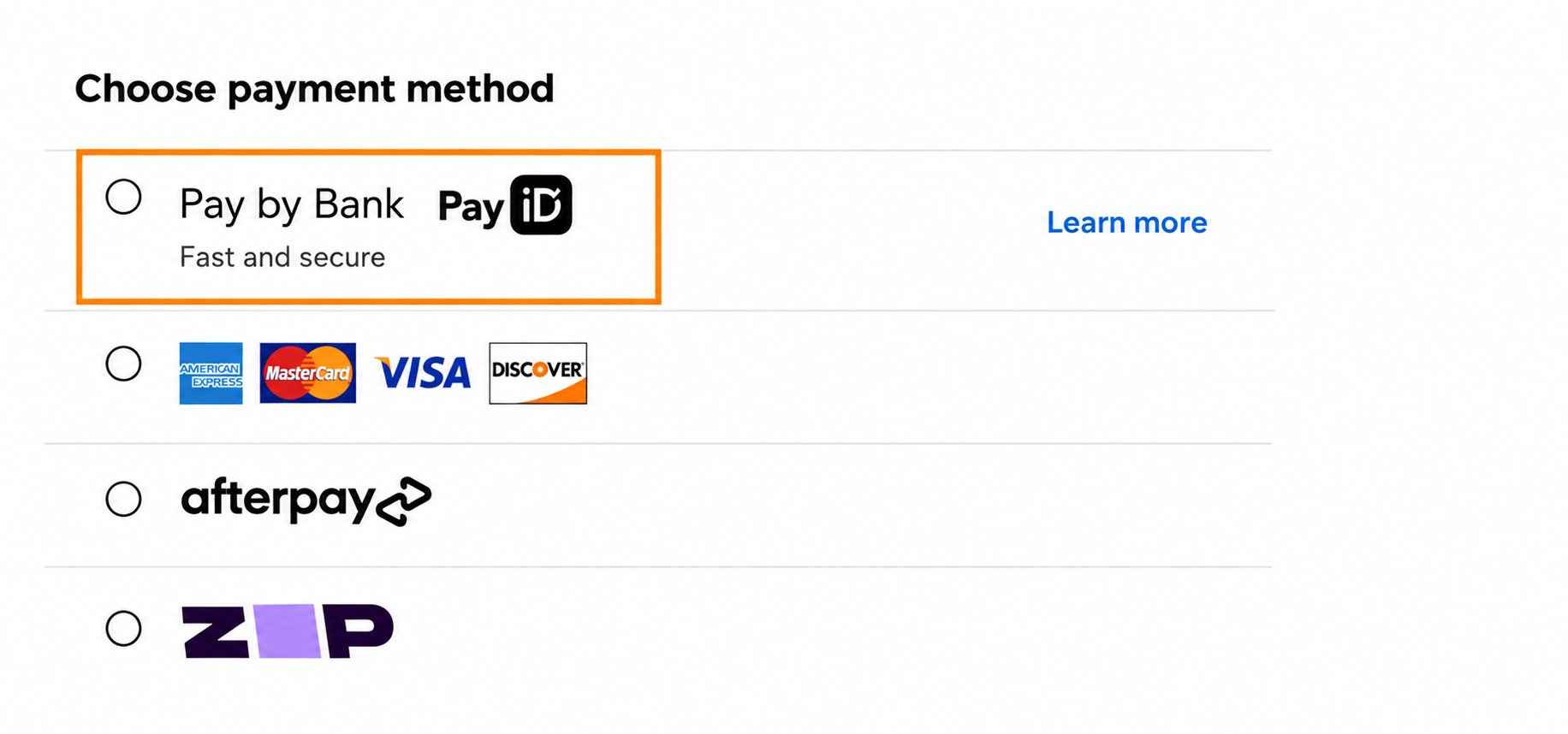
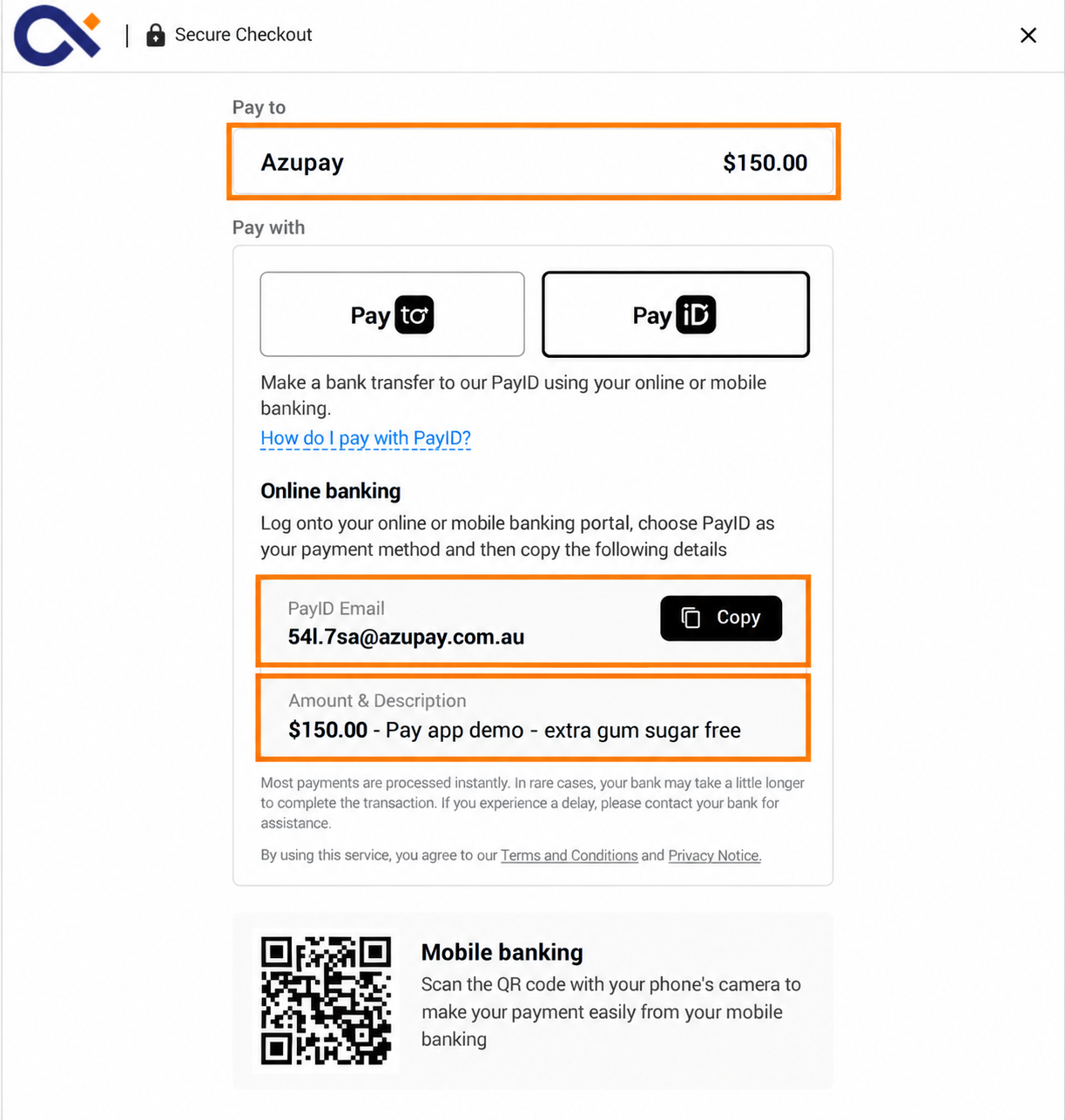
Must do #2: Display payment details
- Clearly display the payment amount required for the purchase or payment due.
- Clearly display your merchant or business name.
- Clearly display the PayID that the user is required to make payment to.
- Display the custom description for the payment
Best practice
Select each item to see the details.
#1: Make PayID easy to recognise and find
Make PayID easy to recognise and find when customers choose how to pay.
Where PayID is offered alongside other payment methods:
- Place PayID prominently in the payment method list, ideally near the top.
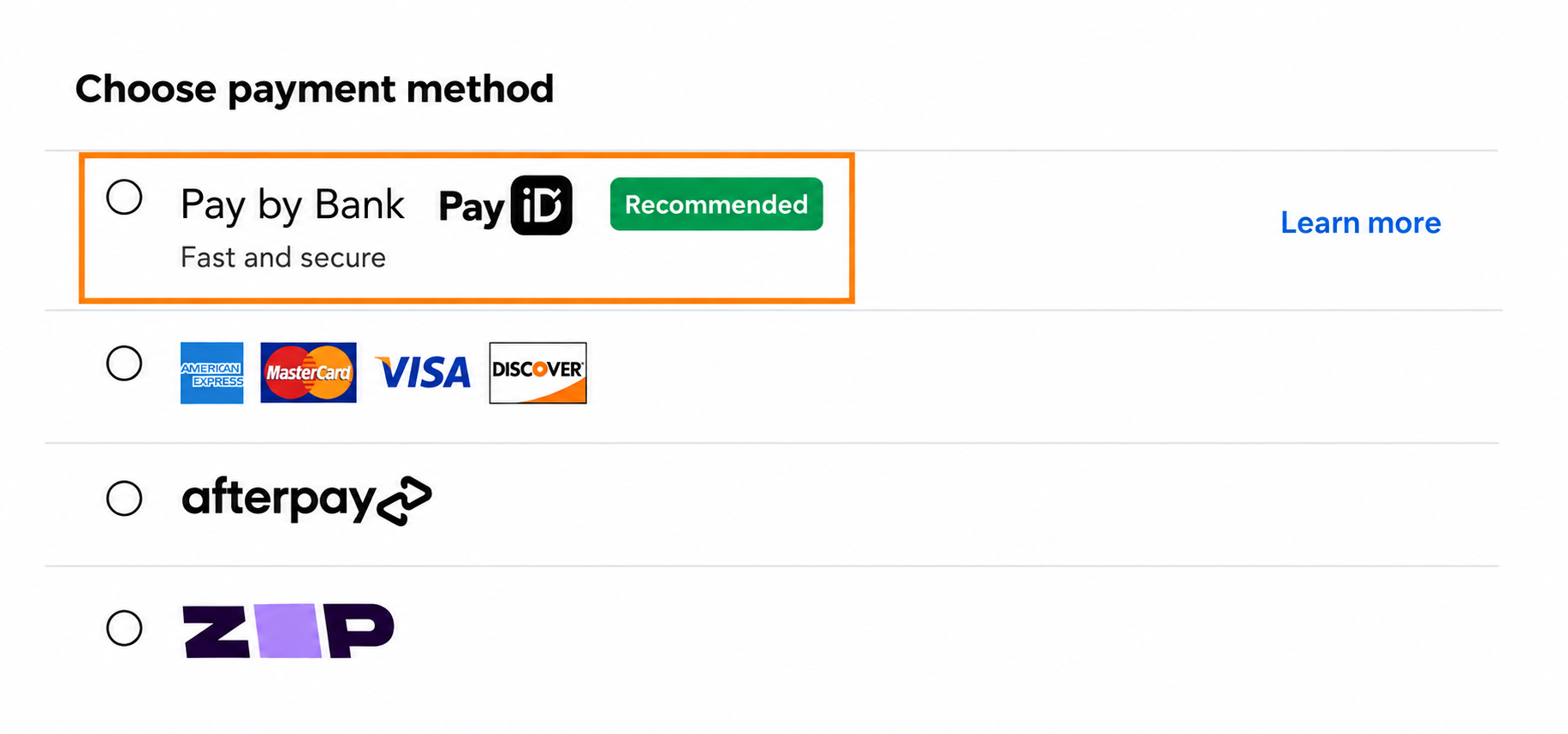
- Use “Pay by Bank” as the payment method name to make the option clear to customers who may be unfamiliar with PayID.
- Include the PayID logo to provide immediate visual recognition.
- If PayID is a new payment option, highlight it through your website, customer communications or other appropriate channels.
- Consider placing your lowest-cost payment method first where this aligns with your payment strategy.
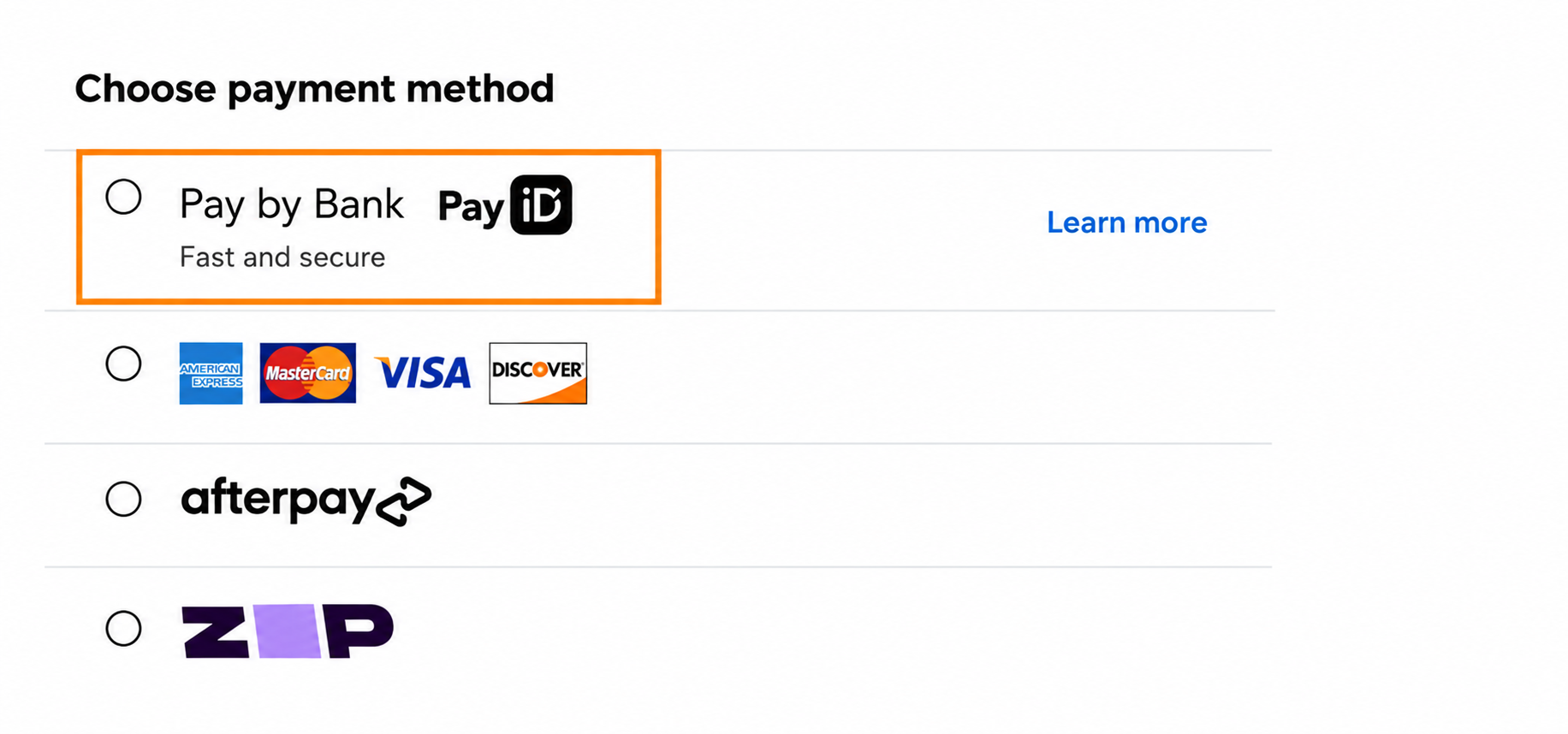
#2: Copy button for PayID
Ensure there is an easy-to-find, prominently styled Copy button for the PayID, allowing customers to quickly copy the PayID and paste it into their banking app when making the payment.
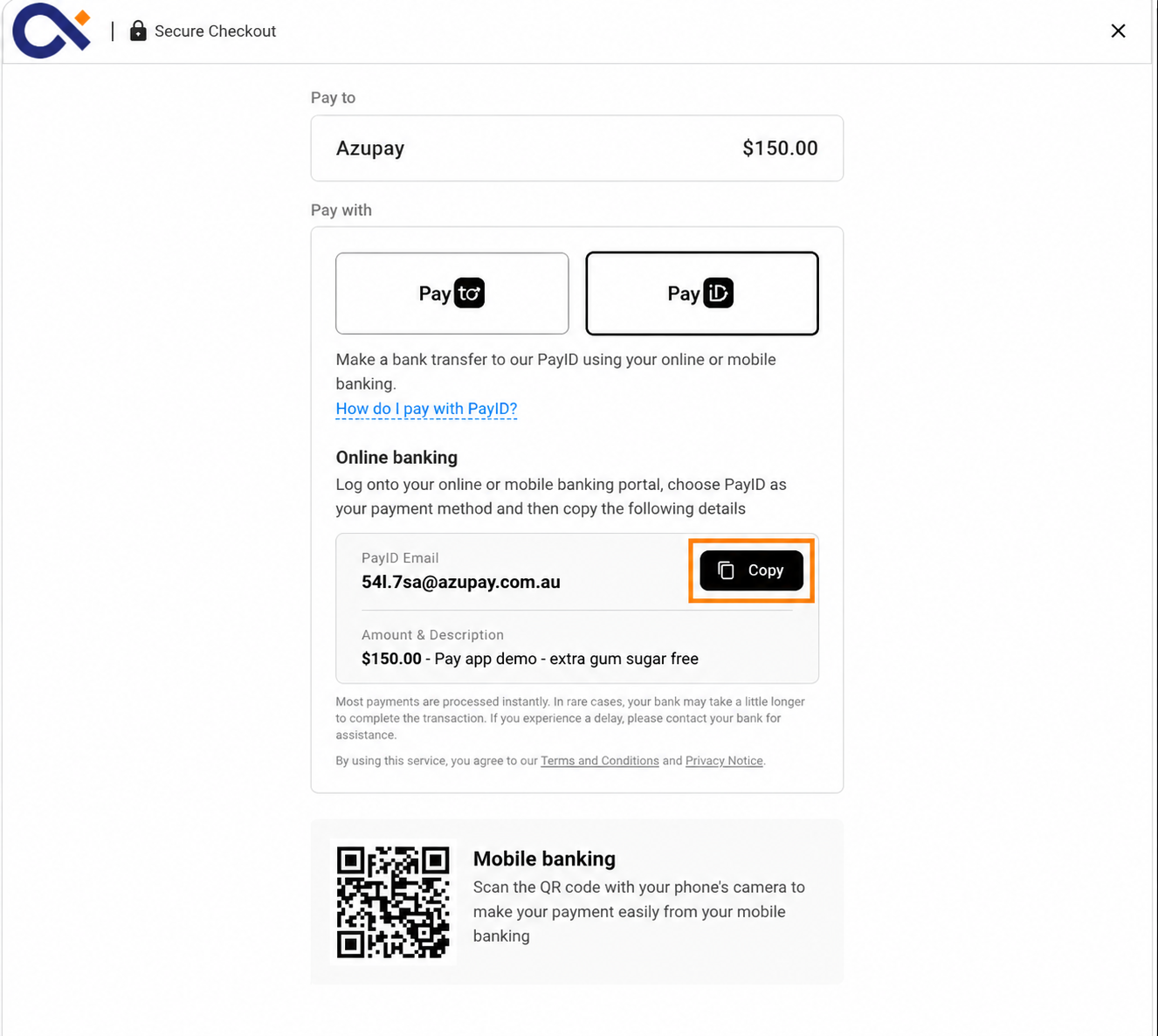
#3: Add a coloured flag and a PayID feature description
Display a short description of PayID next to the payment option. You can also add a flag, such as "Recommended" or "New". Our suggested inclusions are:
- Fast and secure
- Instant and secure
- Recommended
- New
Give the flag a colour so that customers see it. Use a colour that is different from the rest of your checkout, and make sure the text on the flag is easy to read.
Why this helps:
- It helps repeat payers try a new method. Returning customers often choose the method they used last time without thinking. A short description or a flag makes them stop and look at PayID.
- It tells payers about a new payment method. Many customers don't know that PayID is now an option, or what it is. A few words make it clear.
- It helps you reduce your costs. When more customers pay with PayID instead of cards, you pay less to accept payments.
- It builds trust. "Secure" and "Recommended" tell customers that you support this method and that it's safe to use.
#4: Pending payment information
Display information that in some instances the payment may have been held by the customer's bank.
In rare edge cases, payers may experience a delay. We recommend advising them to contact their bank if this occurs.

#5: Educational content
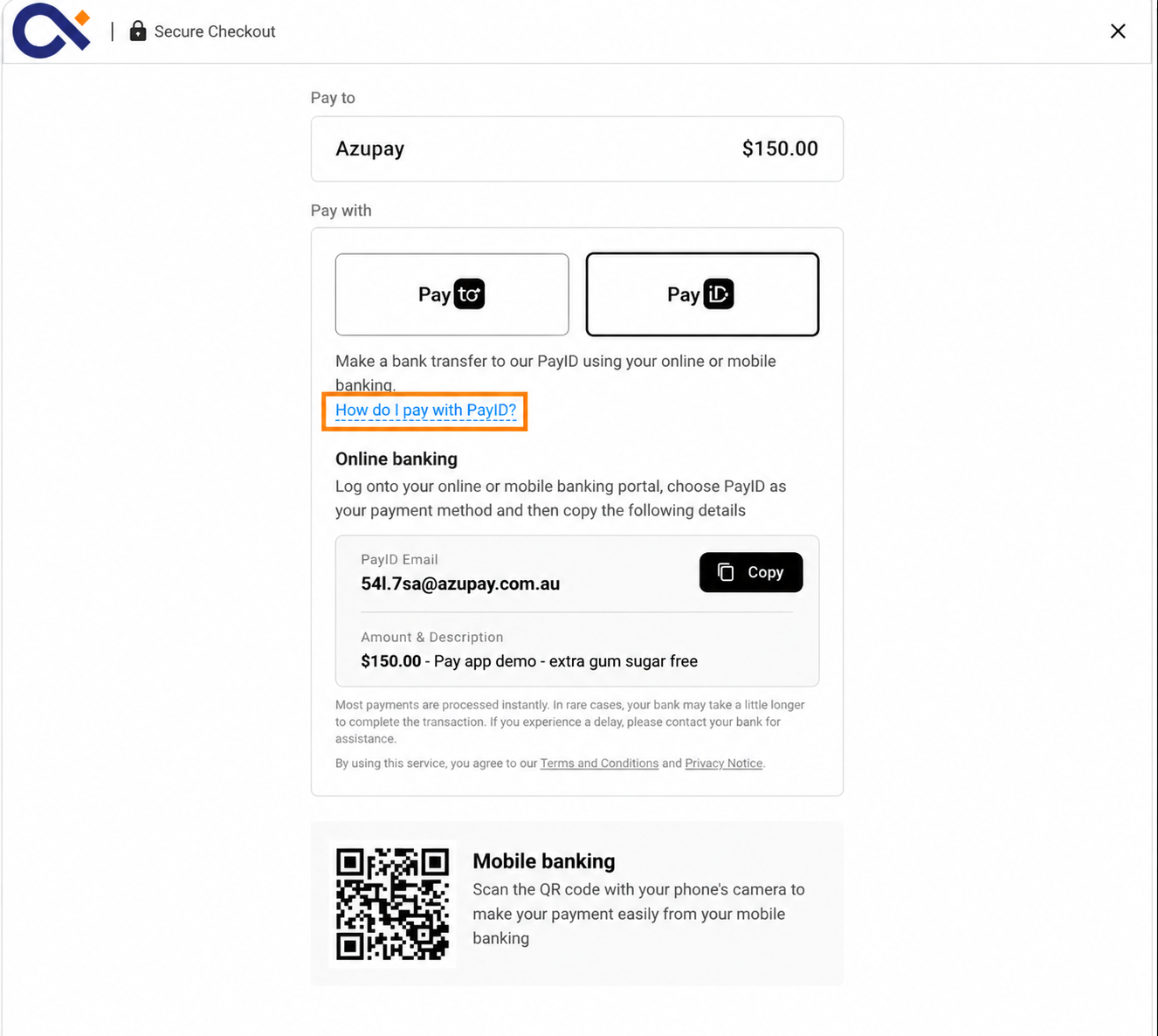
On your main payment landing page - link to educational content that will help your customers understand how to pay with PayID. You can create your own content or use these links:
- How to make a fast and secure PayID payment
- PayID step-by-step instructions
- PayID benefits
- Learn more
#6: Friendly PayIDs
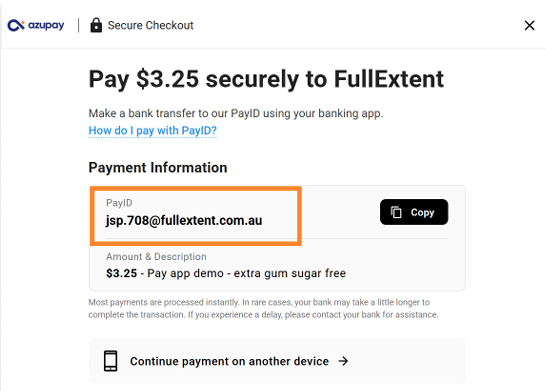
- When creating a payment request via API, you can send Azupay a client reference to customise the PayID for your customer.
- Ensure the PayID prefix you create for your customers are short, less than 8 characters in case your customers need to manually type in the PayID to their online banking or mobile banking app
- Examples of this can include customer initials or account numbers.
Learn about unique PayIDs
#7: Offer an incentive to pay with PayID, such as cashback
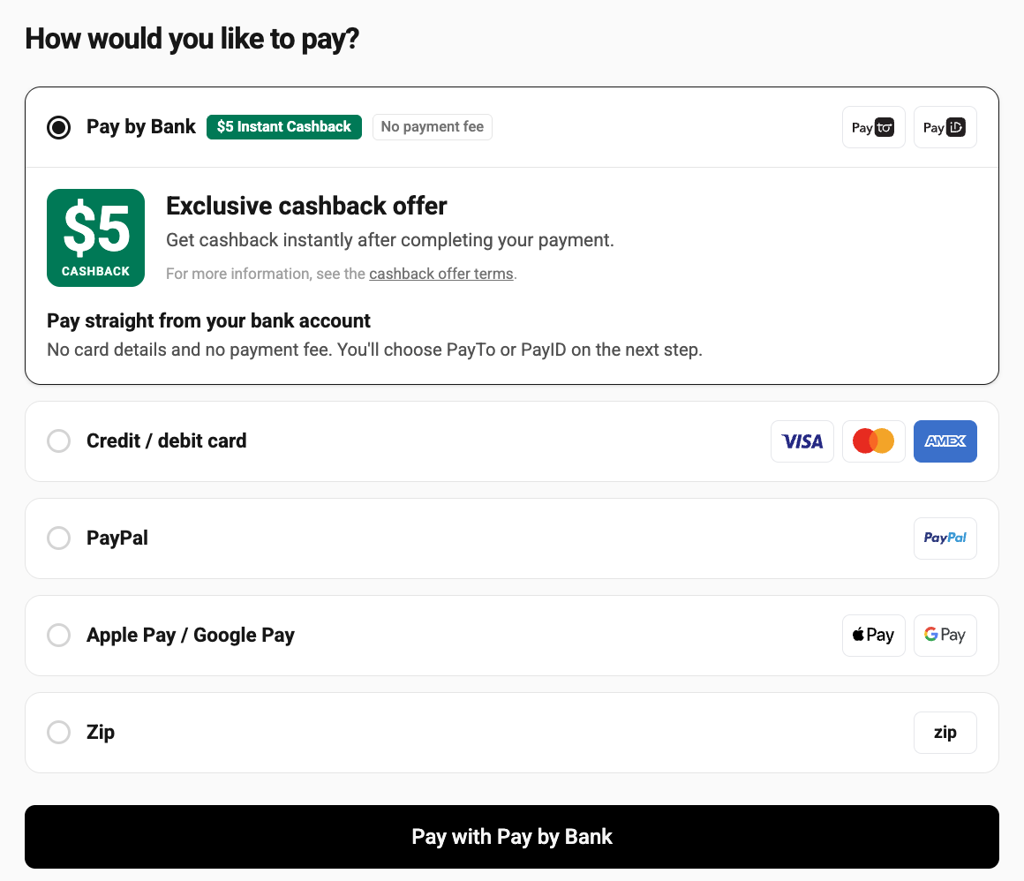
We recommend that you give customers an incentive to pay with PayID. Cashback is a simple and effective choice. When you offer cashback, show the offer clearly at checkout. Customers must see the benefit before they choose how to pay.
Why this helps:
- It gives customers a reason to change. Most customers use the payment method they know. An incentive gives them a clear reason to try PayID.
- It builds a new habit. After customers use PayID once and see how fast and easy it is, they are more likely to use it again, with or without the offer.
- It can reduce your costs. If PayID costs you less to accept than cards, the saving on each payment can pay for the cashback.
- It makes PayID stand out. An offer next to the PayID option helps customers see it among the other payment methods.
Cashback with Azupay: Cashback is available in the Azupay Pay by Bank checkout app.To set it up, contact [email protected]
How to show the offer:
- Show the cashback amount in plain language next to the PayID option. For example, "Get $10 cashback when you pay with PayID".
- Only show the offer against payment options that qualify. If a minimum spend applies, say so.
- Don't describe cashback as a lower price. The customer still pays the full amount.
- After payment, confirm that the payment is complete and show the full amount paid.
- Tell the customer when to expect the cashback and where it will go, for example the bank account they paid from.
- Let customers finish checkout straight away. Don't make them wait for the cashback to arrive.
Keep the offer terms, such as dates, minimum spend and limits, easy to find. Remove the cashback message as soon as the offer ends or is paused.
#8: Loyalty programs (Customer Incentives)
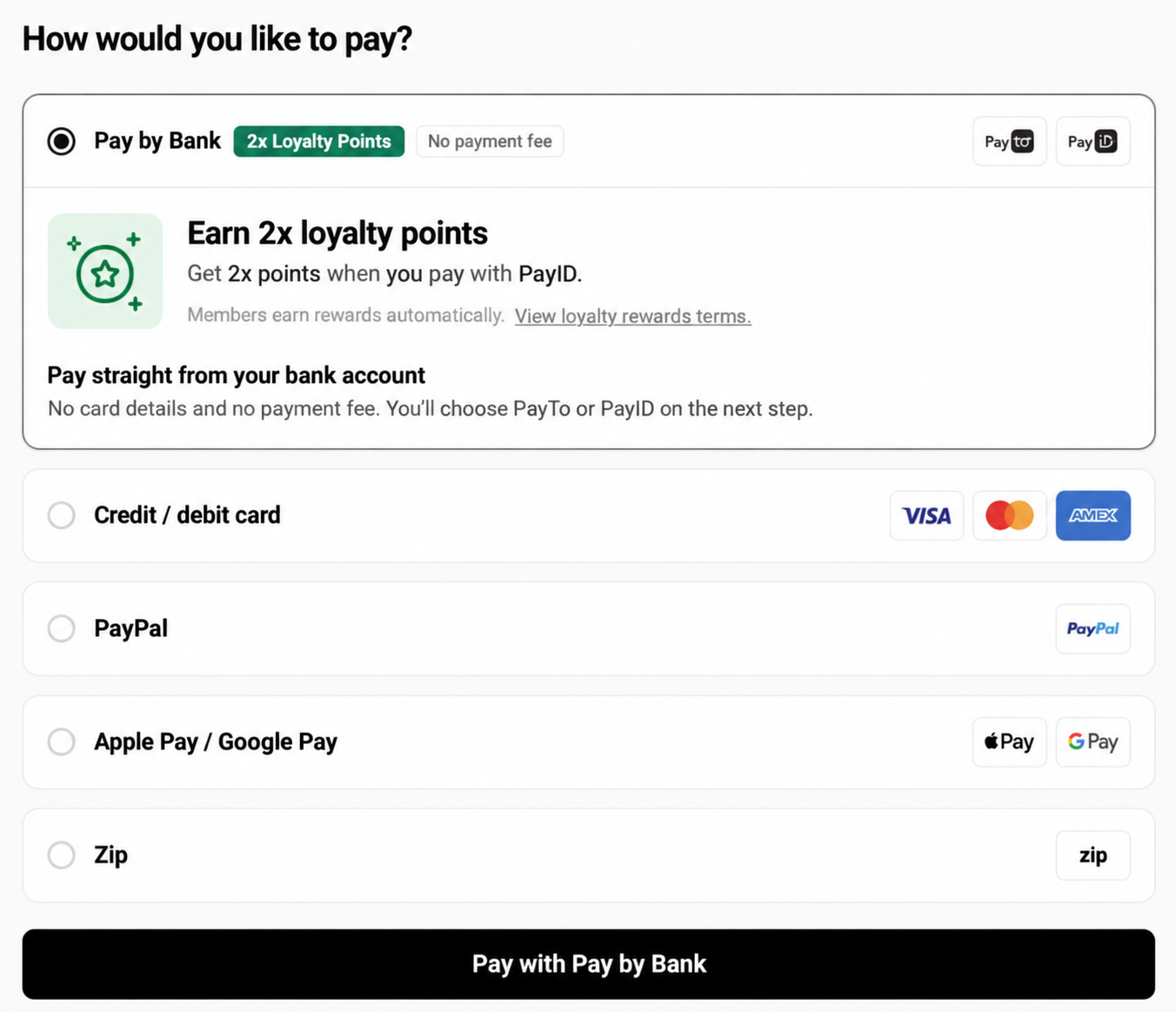
If you run a loyalty program, reward members for paying with PayID. Bonus points are a simple way to do this.
- Show the reward next to the PayID option. For example, "Earn 2x points when you pay with PayID".
- Remind signed-in members of the reward before they choose how to pay.
- Prompt guests to sign in or join before they pay, so they don't miss out.
- On the confirmation screen, show the points earned and when they will appear in the member's account.
- Keep the reward rules short and link to the full terms.
Why this helps:
- It gives customers a reason to change. Most customers use the payment method they know. An incentive gives them a clear reason to try PayID.
- It builds a new habit. After customers use PayID once and see how fast and easy it is, they are more likely to use it again, with or without the offer.
- It makes PayID stand out. An offer next to the PayID option helps customers see it among the other payment methods.
Use the same program name and points language that customers see elsewhere on your website or app. A familiar offer is easier to trust.
#9: Discounts for eligible payments (Customer Incentives)
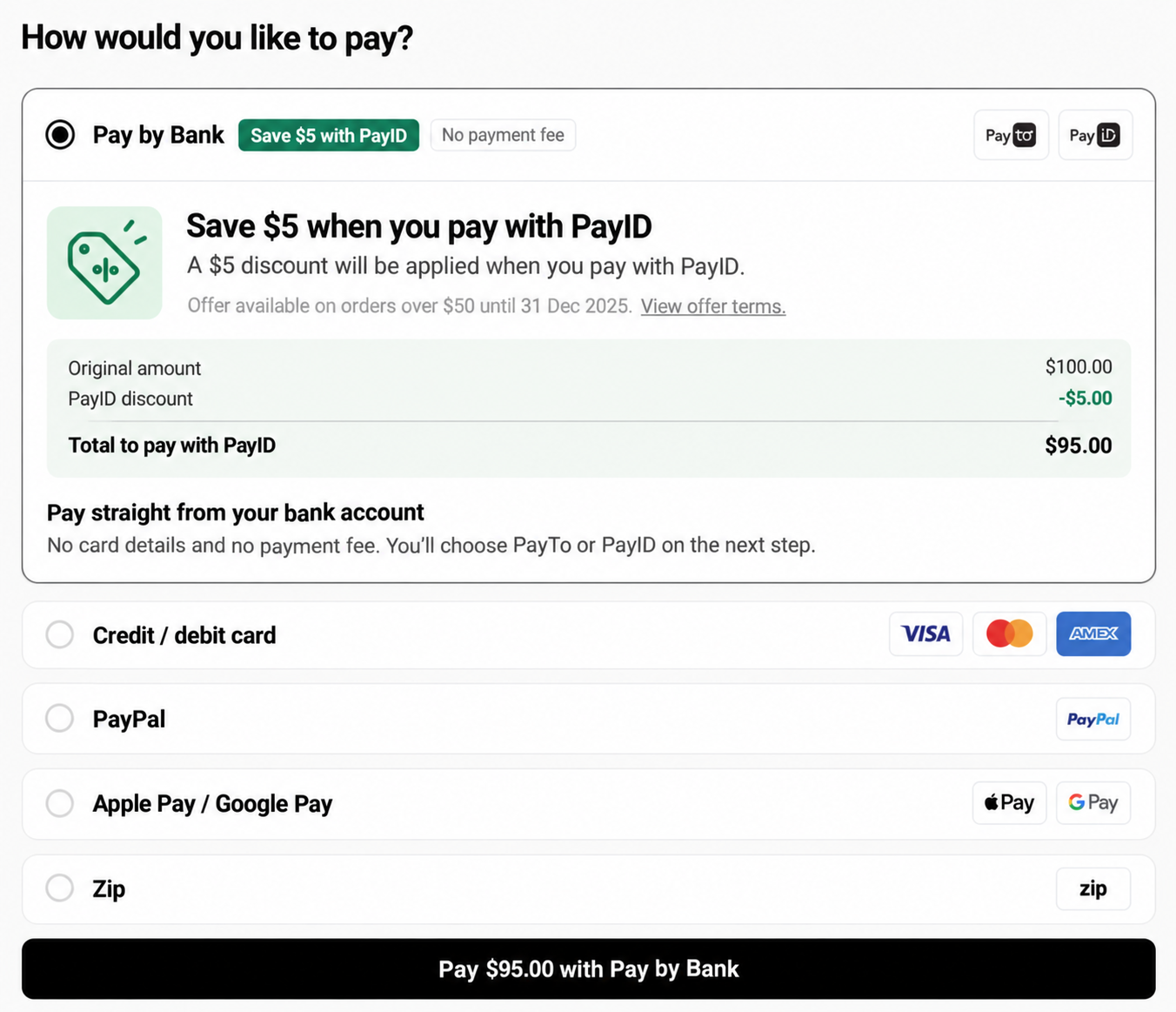
If you offer a discount for paying with PayID, make the saving visible before the customer chooses how to pay.
- Show the discount next to the PayID option. For example, "Save 2% when you pay with PayID" or "$5 off when you pay with PayID".
- Show the original amount, the discount and the new total, so the customer can see what they save.
- Create the payment request for the discounted amount. The amount the customer sees must match the amount they pay.
- State any conditions, such as minimum spend or offer dates. If a purchase doesn't qualify, don't show the discount.
- On the confirmation screen, show the amount paid and the amount saved.
Why this helps:
- It gives customers a reason to change. Most customers use the payment method they know. An incentive gives them a clear reason to try PayID.
- It builds a new habit. After customers use PayID once and see how fast and easy it is, they are more likely to use it again, with or without the offer.
- It can reduce your costs. If PayID costs you less to accept than cards, the saving on each payment can pay for the discount.
- It makes PayID stand out. An offer next to the PayID option helps customers see it among the other payment methods.
If the customer changes their payment method after they see the discount, update the total straight away. Make it clear in your terms how refunds work for discounted purchases.
Optional considerations
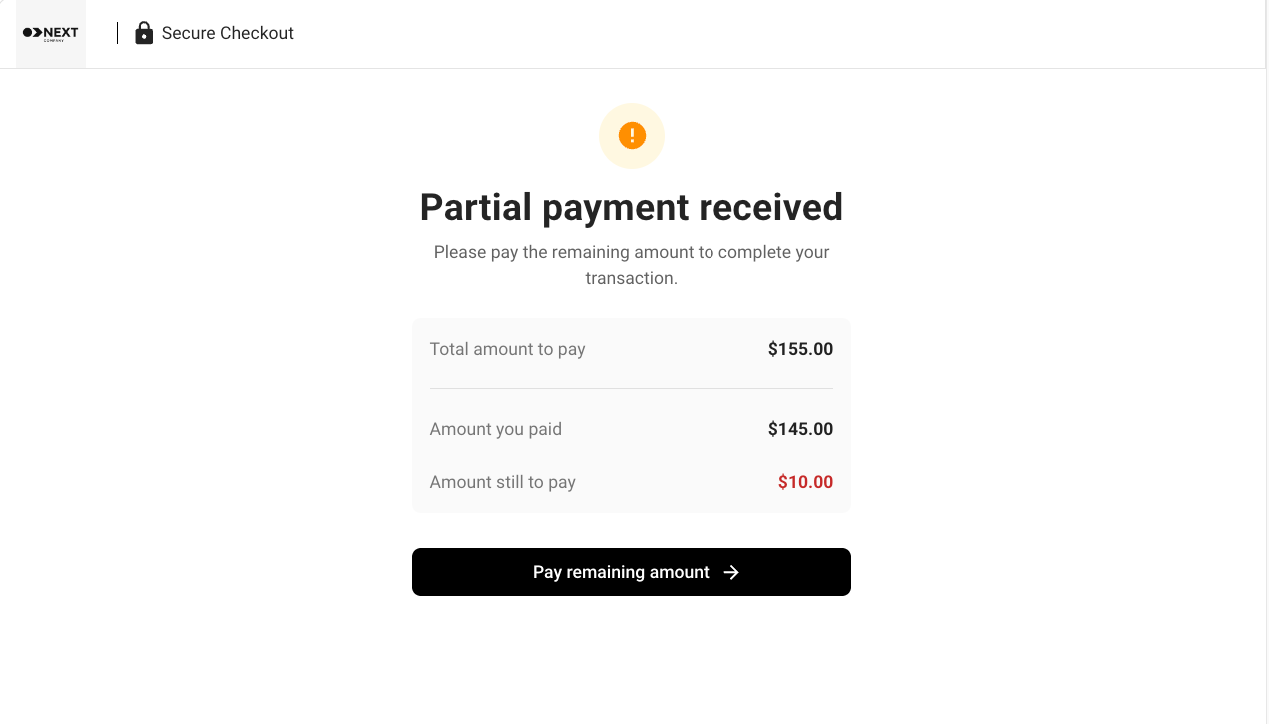
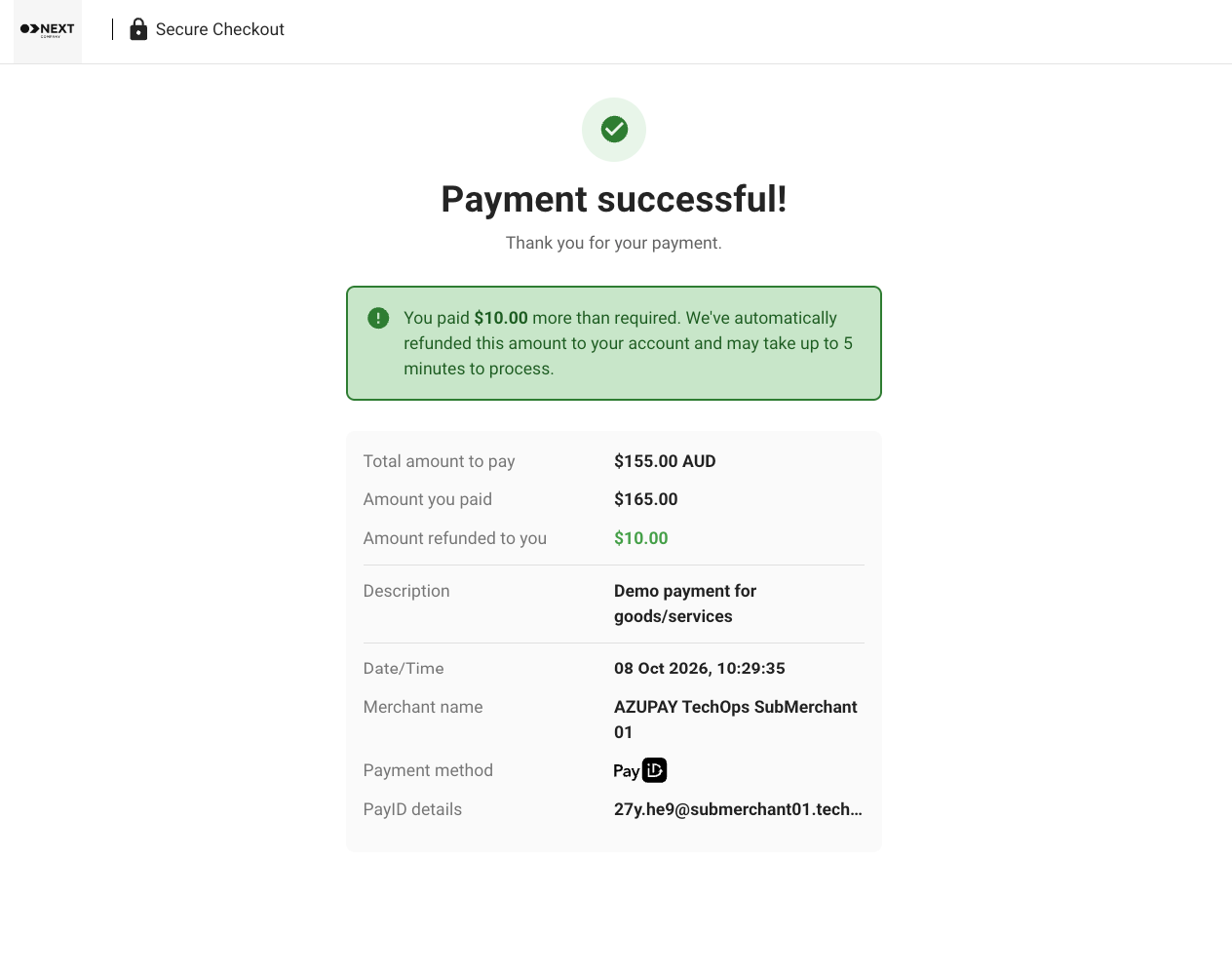
These features are optional. Use the tabs to compare them.
Appendix
Azupay has a Pay by Bank UX solution - ready to use!
Did you know? Azupay has designed a checkout experience linked to each payment request. We call this our Pay by Bank UX solution.
Based on our user research and understanding of payment behaviours, we have designed and tested the app to maximise the conversion rate of payments via PayID and to reduce the integration effort required by our customers.
The Pay by Bank UX solution is:
- ✅ Fully screen responsive
- ✅ Available as an embedded iFrame or as a full checkout experience
- ✅ Customisable, with logos, colours and URL redirection managed within the dashboard
- ✅ Designed to minimise user content, clicks and decisions, as cognitive overload leads to dropouts during payment experiences
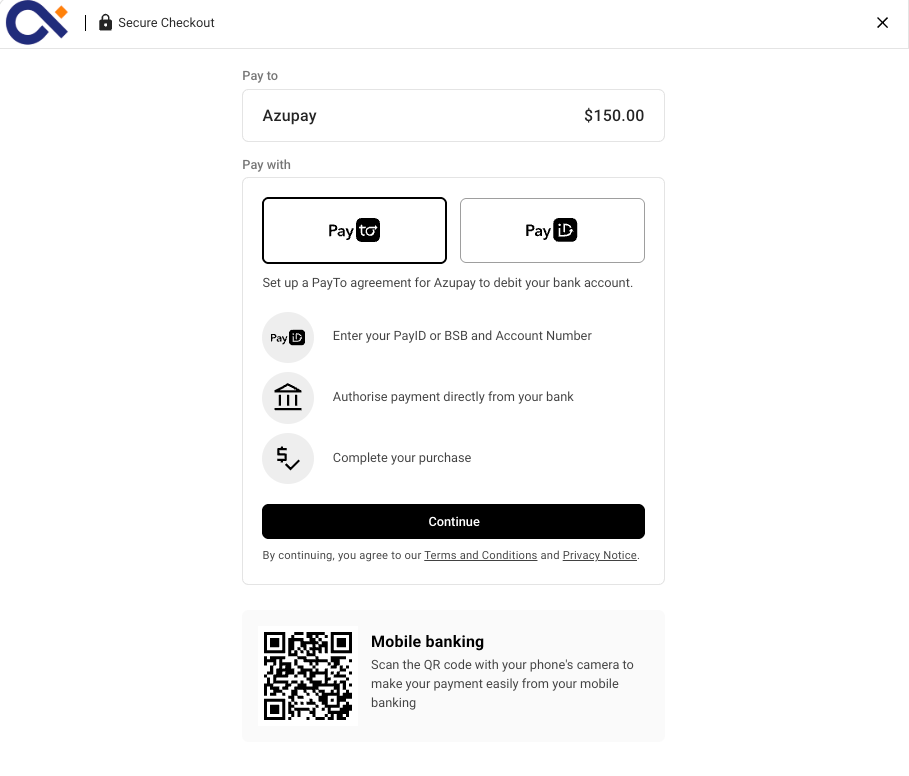
Use the prototype below to click through the Pay by Bank checkout flow. You can also open the prototype in Figma.
Support, contacts and resources
Updated 6 days ago